Pandas is a python library for analyzing data; it supports multiple data inputs.
The article is based on an English-language article Building a neural network with python (broken link), and on a pandas tutorial (broken link).
This tutorial will use a dataset in csv format about wines (chemical analysis to determine the origin of wines).
Below, the way to handle the data from the file wine_data.csv is described step by step.
You can download the file Pandas.py and Pandas.ipynb from github.
Import Pandas as pd:
>>> import pandas as pdExtract the data from the csv file and define the column names:
>>> wine = pd.read_csv('wine_data.csv', names = ["Cultivator", "Alchol", "Malic_Acid", "Ash", "Alcalinity_of_Ash", "Magnesium", "Total_phenols", "Falvanoids", "Nonflavanoid_phenols", "Proanthocyanins", "Color_intensity", "Hue", "OD280", "Proline"])Show the first rows of data:
>>> wine.head()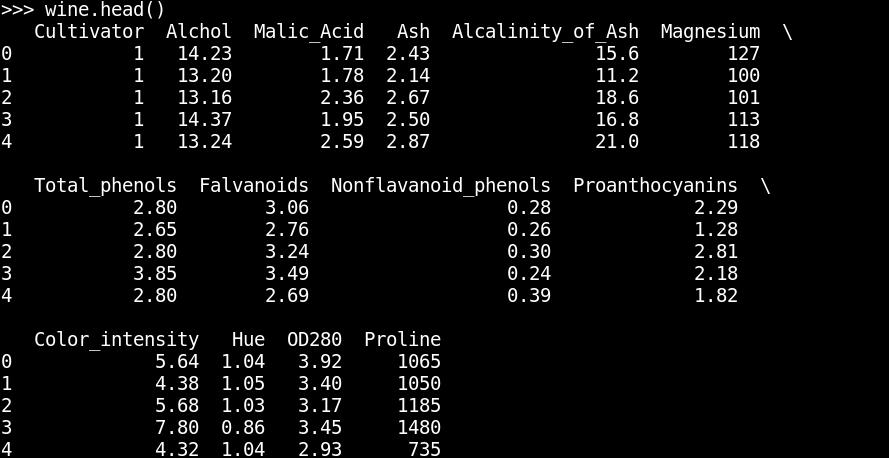
Show the dimensions of the table:
>>> wine.shape
(178, 14)
There are 178 rows and 14 columns.
Show the first 2 rows of the table:
wine.loc[[0,1]]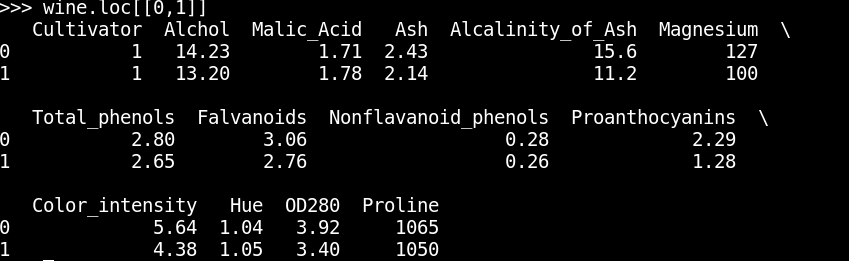
Show the first two rows and the Cultivator and Alchol columns
>>> wine.loc[[0,1]][["Cultivator","Alchol"]]
This introduction is necessary since future articles will work a lot with the pandas library.
Make a donation! If you liked the article you can make a donation with Bitcoin (BTC) using the digital wallet of your choice to the following address: 17MtNybhdkA9GV3UNS6BTwPcuhjXoPrSzV
Or by scanning the QR code from your wallet:
