In the previous article I showed the development of a Python application that configures keyboard shortcuts for gnome through gconf from the command line.
You can download the graphical interface of the application from the following link (broken link) , the Python code of the application here (broken link) and the module configGconf.py (broken link).
The graphical interface was created with glade using gtkbuilder instead of libglade; that is one of the main differences from the other graphical applications shown in this blog. The interface has several check buttons to select which shortcut key options you want to configure.
The following figure shows the interface developed with glade.
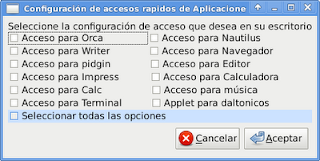
Below is the source code of the application:
#!/usr/bin/env python
# -*- coding: utf-8 -*-
"""
Name: pyconfig-accessgnome-uy
Description: Aplicación gráfica que permite configurar los accesos rápidos de teclado a gconf
Version:0.1
License: GPLv3
Copyright: Copyright (C) 2009  Libre Accesibilidad
Author: Ernesto Nadir Crespo Avila
Email: ecrespo@gmail.com

"""


#Importar módulo gtk y el módulo de cambios de opciones de teclado
import gtk,configGconf


#Clse AccessGnomeCOnfig
class AccessGnomeConfig:
 def __init__(self):

                #Uso de la interfaz desarrollada con gtkbuilder y llamado del mismo.
  self.glade_file = "ui.glade"
  self.glade = gtk.Builder()
  self.glade.add_from_file(self.glade_file)
  # Asociación de todos los widgets
  self.window = self.glade.get_object('dialog1')
  self.button1 = self.glade.get_object('button1')
  self.button2 = self.glade.get_object('button2')
  self.checkbutton1 = self.glade.get_object('checkbutton1')
  self.checkbutton2 = self.glade.get_object('checkbutton2')
  self.checkbutton3 = self.glade.get_object('checkbutton3')
  self.checkbutton4 = self.glade.get_object('checkbutton4')
  self.checkbutton5 = self.glade.get_object('checkbutton5')
  self.checkbutton6 = self.glade.get_object('checkbutton6')
  self.checkbutton7 = self.glade.get_object('checkbutton7')
  self.checkbutton8 = self.glade.get_object('checkbutton8')
  self.checkbutton9 = self.glade.get_object('checkbutton9')
  self.checkbutton10 = self.glade.get_object('checkbutton10')
  self.checkbutton11 = self.glade.get_object('checkbutton11')
  self.checkbutton12 = self.glade.get_object('checkbutton12')
  self.checkbutton13 = self.glade.get_object('checkbutton13')
  self.aplicaciones = []


  # asociar las señales de los widgets con los métodos de la clase
  self.window.connect ("close",self.on_dialog1_close)
  self.window.connect("destroy",self.on_dialog1_destroy)
  self.button1.connect ("clicked",self.on_button1_clicked)
  self.button2.connect ("clicked",self.on_button2_clicked)
  self.checkbutton1.connect("toggled",self.on_checkbutton1_toggled)
  self.checkbutton2.connect("toggled",self.on_checkbutton2_toggled)
  self.checkbutton3.connect("toggled",self.on_checkbutton3_toggled)
  self.checkbutton4.connect("toggled",self.on_checkbutton4_toggled)
  self.checkbutton5.connect("toggled",self.on_checkbutton5_toggled)
  self.checkbutton6.connect("toggled",self.on_checkbutton6_toggled)
  self.checkbutton7.connect("toggled",self.on_checkbutton7_toggled)
  self.checkbutton8.connect("toggled",self.on_checkbutton8_toggled)
  self.checkbutton9.connect("toggled",self.on_checkbutton9_toggled)
  self.checkbutton10.connect("toggled",self.on_checkbutton10_toggled)
  self.checkbutton11.connect("toggled",self.on_checkbutton11_toggled)
  self.checkbutton12.connect("toggled",self.on_checkbutton12_toggled)
  self.checkbutton13.connect("toggled",self.on_checkbutton13_toggled)
  #Configuración del  widget ventana, agregandole un título.
  self.window.set_title("Configuración de accesos rapidos de Aplicaciones en Gnome")
  self.window.show_all()
 #Métodos de utilización de los botones de verificación cuando se selecciona o no.
        #Cuando se selecciona se agrega el elemento a una lista
        #Cuando se deselecciona se elimina el elemento de la lista.
 def on_checkbutton1_toggled(self,*args):
  variable = self.checkbutton1.get_active()
  if variable == True:
   self.aplicaciones.append("orca")
  else:
   self.__eliminacion("orca")

 def on_checkbutton2_toggled(self,*args):
  variable = self.checkbutton2.get_active()
  if variable == True:
   self.aplicaciones.append("nautilus")
  else:
   self.__eliminacion("nautilus")

 def on_checkbutton3_toggled(self,*args):
  variable = self.checkbutton3.get_active()
  if  variable == True:
   self.aplicaciones.append("oowriter")
  else:
   self.__eliminacion("oowriter")

 def on_checkbutton4_toggled(self,*args):
  variable = self.checkbutton4.get_active()
  if  variable == True:
   self.aplicaciones.append("iceweasel")
  else:
   self.__eliminacion("iceweasel")

 def on_checkbutton5_toggled(self,*args):
  variable = self.checkbutton5.get_active()
  if  variable == True:
   self.aplicaciones.append("pidgin")
  else:
   self.__eliminacion("pidgin")

 def on_checkbutton6_toggled(self,*args):
  variable = self.checkbutton6.get_active()
  if  variable == True:
   self.aplicaciones.append("gedit")
  else:
   self.__eliminacion("gedit")

 def on_checkbutton7_toggled(self,*args):
  variable = self.checkbutton7.get_active()
  if  variable == True:
   self.aplicaciones.append("ooimpress")
  else:
   self.__eliminacion("ooimpress")

 def on_checkbutton8_toggled(self,*args):
  variable = self.checkbutton8.get_active()
  if  variable == True:
   self.aplicaciones.append("gnome-calculator")
  else:
   self.__eliminacion("gnome-calculator")

 def on_checkbutton9_toggled(self,*args):
  variable = self.checkbutton9.get_active()
  if  variable == True:
   self.aplicaciones.append("oocalc")
  else:
   self.__eliminacion("oocalc")

 def on_checkbutton10_toggled(self,*args):
  variable = self.checkbutton10.get_active()
  if  variable == True:
   self.aplicaciones.append("rhythmbox")
  else:
   self.__eliminacion("rhythmbox")

 def on_checkbutton11_toggled(self,*args):
  variable = self.checkbutton11.get_active()
  if  variable == True:
   self.aplicaciones.append("gnome-terminal")
  else:
   self.__eliminacion("gnome-terminal")

 def on_checkbutton12_toggled(self,*args):
  pass
  """
  variable = self.checkbutton12.get_active()
  if  variable == True:
   print "daltonicos"
  else:
   print "nada de daltonicos"
  """
 def __eliminacion(self,aplicacion):
                #Elimina un elemento de la lista
  if len(self.aplicaciones) >= 2:
   for i in range(len(self.aplicaciones)):
    if self.aplicaciones[i] == aplicacion:
     self.aplicaciones[i:i+1] = []
     break
    else:
     continue
  elif len(self.aplicaciones) == 1:
   if self.aplicaciones[0] == aplicacion:
    self.aplicaciones = []
   else:
    pass
  else:
   pass


 def on_checkbutton13_toggled(self,*args):
                #Selecciona todos los botones de verificación o los deselecciona a todos.
  variable = self.checkbutton13.get_active()
  if  variable == True:
   self.checkbutton1.set_active(1)
   self.checkbutton2.set_active(1)
   self.checkbutton3.set_active(1)
   self.checkbutton4.set_active(1)
   self.checkbutton5.set_active(1)
   self.checkbutton6.set_active(1)
   self.checkbutton7.set_active(1)
   self.checkbutton8.set_active(1)
   self.checkbutton9.set_active(1)
   self.checkbutton10.set_active(1)
   self.checkbutton11.set_active(1)
   #self.checkbutton12.set_active(1)
  else:
   self.checkbutton1.set_active(0)
   self.checkbutton2.set_active(0)
   self.checkbutton3.set_active(0)
   self.checkbutton4.set_active(0)
   self.checkbutton5.set_active(0)
   self.checkbutton6.set_active(0)
   self.checkbutton7.set_active(0)
   self.checkbutton8.set_active(0)
   self.checkbutton9.set_active(0)
   self.checkbutton10.set_active(0)
   self.checkbutton11.set_active(0)
   #self.checkbutton12.set_active(0)


 def on_dialog1_close(self,*args):
                #Cierra la ventana de dialogo
  gtk.main_quit()

 def on_dialog1_destroy(self,*args):
                #Cierra la ventana de dialogo
  gtk.main_quit()

 def on_button1_clicked(self,*args):
                #Cierra la ventana de dialogo
  gtk.main_quit()

 def on_button2_clicked(self,*args):

                #Llama al módulo configGconf para aplicar los cambios con gconf

                Config = configGconf.Conf()
  Config.modificar_opcion(self.aplicaciones)

 def main(self): #Método que ejecuta el programa
  gtk.main()


if __name__ == "__main__":
       Instancia del objeto AccessGnomeConfig y ejecución del programa
 app = AccessGnomeConfig()
 app.main()
The applet option for color-blind users is not enabled at the moment, since I am working on adding the applet automatically to the gnome top panel through gconf. The next improvement will be removing settings from gconf.
In the next article I will create the Python .tar.gz package to upload it to the official Python repository and then create a package for Debian.
===
Make a donation! If you liked the article you can make a donation with Bitcoin (BTC) using the digital wallet of your choice to the following address: 17MtNybhdkA9GV3UNS6BTwPcuhjXoPrSzV
Or by scanning the QR code from your wallet:
