Previous articles have covered the topic of a mongodb database with python; this article covers a binary file that stores JSON documents instead of using a mongodb server.
The first thing to do is create a file with the bson extension where a dictionary (json) with random data will be saved, and then look up the information in the file.
You need to have the bson library for python installed:
apt-get install python-bson python3-bsonWriting to a bson file:
#!/usr/bin/env python3

#Se importa el módulo bson

import bson

#Se abre el archivo prueba.bson para escritura y binario

f = open("prueba.bson", 'wb')

#Se intenta guardando un rango de valores del 1 al 99 decodificandolo en formato bson

try:

    for i in range(1,100):

        f.write(bson.BSON.encode({"dato":i}))

finally:

    f.close()
After running the script, an ls shows that the file pruebas.bson has been created and has data inside:
ls -l prueba.bson
-rw-r--r-- 1 ernesto ernesto 1485 dic 13 12:16 prueba.bson
The reading code is shown below:
#!/usr/bin/env python3

#Se importa la libería bson

import bson

#Se abre el archivo prueba.bson en modo lectura y binario

f = open("prueba.bson", 'rb')

#Se extrae la información almacenada y se decodifica el bson

resultado = bson.decode_all(f.read())

#Se imprime en pantalla la lista

print (resultado)
The result of running the script is shown below:
python lectura.py

[{u'dato': 1}, {u'dato': 2}, {u'dato': 3}, {u'dato': 4}, {u'dato': 5}, {u'dato': 6}, {u'dato': 7}, {u'dato': 8}, {u'dato': 9}, {u'dato': 10}, {u'dato': 11}, {u'dato': 12}, {u'dato': 13}, {u'dato': 14}, {u'dato': 15}, {u'dato': 16}, {u'dato': 17}, {u'dato': 18}, {u'dato': 19}, {u'dato': 20}, {u'dato': 21}, {u'dato': 22}, {u'dato': 23}, {u'dato': 24}, {u'dato': 25}, {u'dato': 26}, {u'dato': 27}, {u'dato': 28}, {u'dato': 29}, {u'dato': 30}, {u'dato': 31}, {u'dato': 32}, {u'dato': 33}, {u'dato': 34}, {u'dato': 35}, {u'dato': 36}, {u'dato': 37}, {u'dato': 38}, {u'dato': 39}, {u'dato': 40}, {u'dato': 41}, {u'dato': 42}, {u'dato': 43}, {u'dato': 44}, {u'dato': 45}, {u'dato': 46}, {u'dato': 47}, {u'dato': 48}, {u'dato': 49}, {u'dato': 50}, {u'dato': 51}, {u'dato': 52}, {u'dato': 53}, {u'dato': 54}, {u'dato': 55}, {u'dato': 56}, {u'dato': 57}, {u'dato': 58}, {u'dato': 59}, {u'dato': 60}, {u'dato': 61}, {u'dato': 62}, {u'dato': 63}, {u'dato': 64}, {u'dato': 65}, {u'dato': 66}, {u'dato': 67}, {u'dato': 68}, {u'dato': 69}, {u'dato': 70}, {u'dato': 71}, {u'dato': 72}, {u'dato': 73}, {u'dato': 74}, {u'dato': 75}, {u'dato': 76}, {u'dato': 77}, {u'dato': 78}, {u'dato': 79}, {u'dato': 80}, {u'dato': 81}, {u'dato': 82}, {u'dato': 83}, {u'dato': 84}, {u'dato': 85}, {u'dato': 86}, {u'dato': 87}, {u'dato': 88}, {u'dato': 89}, {u'dato': 90}, {u'dato': 91}, {u'dato': 92}, {u'dato': 93}, {u'dato': 94}, {u'dato': 95}, {u'dato': 96}, {u'dato': 97}, {u'dato': 98}, {u'dato': 99}]
It returns a list of dictionaries (json) with the data stored in the file.
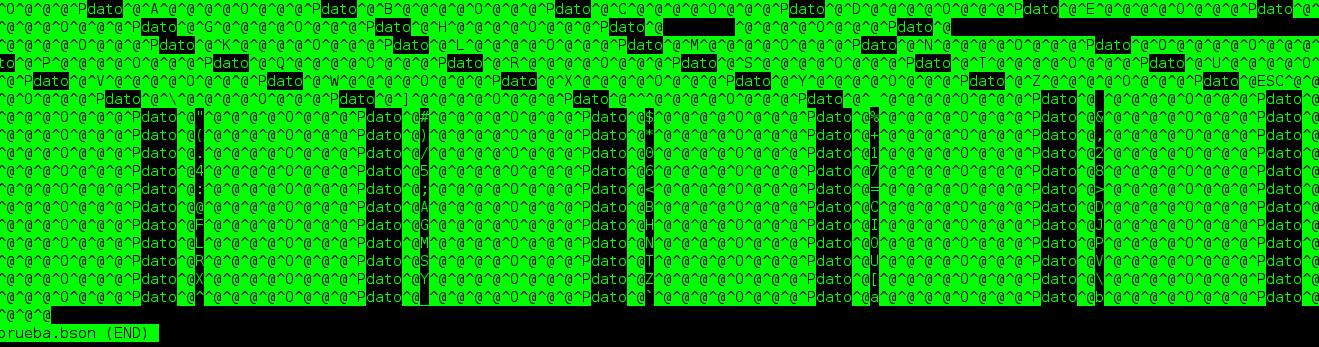
The binary file contains something like the following:
Make a donation! If you liked the article you can make a donation with Bitcoin (BTC) using the digital wallet of your choice to the following address: 17MtNybhdkA9GV3UNS6BTwPcuhjXoPrSzV
Or by scanning the QR code from your wallet:
