Mercurial is a distributed version control system similar to git or bazaar. It is a mix of the ease of use of subversion with the power of git.
To install mercurial on Debian, run aptitude:
aptitude install mercurial mercurial-commonTo see the options of the hg command, run hg on its own; it shows the following:
ecrespo@canaima:~/repositorio$ hg
Mercurial Distributed SCM

basic commands:

add add the specified files on the next commit
annotate show changeset information per file line
clone make a copy of an existing repository
commit commit the specified files or all outstanding changes
diff diff repository (or selected files)
export dump the header and diffs for one or more changesets
imerge interactive merge
init create a new repository in the given directory
inserve start an inotify server for this repository
log show revision history of entire repository or files
merge merge working directory with another revision
parents show the parents of the working dir or revision
pull pull changes from the specified source
push push changes to the specified destination
qdiff diff of the current patch and subsequent modifications
qimport import a patch
qinit init a new queue repository
qpop pop the current patch off the stack
qpush push the next patch onto the stack
qrefresh update the current patch
remove remove the specified files on the next commit
serve export the repository via HTTP
status show changed files in the working directory
strip strip a revision and all later revs on the same branch
update update working directory
view start interactive history viewer

use "hg help" for the full list of commands or "hg -v" for details
To clone a repository, for example the pyloro one on bitbucket.org, run:
hg clone http://bitbucket.org/ecrespo/pyloro/
destination directory: pyloro
requesting all changes
adding changesets
adding manifests
adding file changes
added 3 changesets with 26 changes to 20 files
updating working directory
20 files updated, 0 files merged, 0 files removed, 0 files unresolved
This command makes a complete copy of another repository.
Running ls shows the following:
ecrespo@canaima:~/repositorio$ ls -la
python-loro
Inside the python-loro directory there is the following:
ConfigurepyLoro.py Festival.py MANIFEST pyloro.desktop pyloro.py setup.py Convert.py .hg PKG-INFO pyloro.glade README TODO audio COPYING images pyloro.conf pyloro.png Reproducir.py verifyconfig.pyNote that there is a .hg directory; inside it you will find the following: 00changelog.i branch branch.cache dirstate hgrc requires store undo.branch undo.dirstate
Edit the hgrc file and add the user information, name and email:
[paths]
default = http://bitbucket.org/ecrespo/pyloro/
[ui]
username = Ernesto Nadir Crespo Avila
The first is the path the repository was downloaded from; the second is the user definition.
To see the version control log, run hg log inside the directory:
ecrespo@canaima:~/repositorio/python-loro$ hg log
changeset: 0:8f241da3b2f9
tag: tip
user: ernesto@moonlighting
date: Wed Nov 05 23:32:58 2008 -0430
summary: Agregado pyloro a mercurial

Para una descripción más detallada de log se ejecuta hg -v log
ecrespo@canaima:~/repositorio/pyloro$ hg -v log
changeset: 2:6d1d0bf8236c
tag: tip
user: ecrespo@canaima
date: Wed Apr 08 19:28:08 2009 -0430
files: ConfigurepyLoro.py Convert.py Festival.py Reproducir.py verifyconfig.py
description:
Change developer information in all files dot py


changeset: 1:33662d0db317
user: ecrespo@canaima
date: Wed Apr 08 18:15:04 2009 -0430
files: pyloro.py
description:
Change developer team in pyloro.py


changeset: 0:8f241da3b2f9
user: ernesto@moonlighting
date: Wed Nov 05 23:32:58 2008 -0430
files: COPYING ConfigurepyLoro.py Convert.py Festival.py MANIFEST PKG-INFO README Reproducir.py TODO audio/iniciando.ogg audio/terminando.ogg images/loro.png images/loro_icono.png pyloro.conf pyloro.desktop pyloro.glade pyloro.png pyloro.py setup.py verifyconfig.py
description:
Agregado pyloro a mercurial
Each changeset is a set of changes grouped as a logical unit, a tag is an arbitrary mark or name for a changeset, and the tip is the last change made to the repository, as reflected in the logs.
To make changes, a copy of the repository is made so it can be modified:
hg clone pyloro pyloro-prueba
updating working directory
20 files updated, 0 files merged, 0 files removed, 0 files unresolved
Edit the readme file and make the commit:
hg commit
Change TODO file
HG: Enter commit message. Lines beginning with 'HG:' are removed.
HG: --
HG: user: ecrespo@gmail.com
HG: branch 'default'
HG: changed TODO
Running hg status shows that only the README file has changed:
changeset: 5:0ede87ad831c
tag: tip
user: ecrespo@canaima
date: Thu Apr 09 15:17:50 2009 -0430
summary: Change TODO file

changeset: 4:02e20db62aa8
user: ecrespo@canaima
date: Thu Apr 09 15:14:13 2009 -0430
summary: Change team developer in README file

changeset: 3:85f771c9708c
user: ecrespo@canaima
date: Thu Apr 09 15:12:06 2009 -0430
summary: Agregar al README como bajar pyloro del repositorio mercurial

changeset: 2:6d1d0bf8236c
user: ecrespo@canaima
date: Wed Apr 08 19:28:08 2009 -0430
summary: Change developer information in all files dot py

changeset: 1:33662d0db317
user: ecrespo@canaima
date: Wed Apr 08 18:15:04 2009 -0430
summary: Change developer team in pyloro.py

changeset: 0:8f241da3b2f9
user: ernesto@moonlighting
date: Wed Nov 05 23:32:58 2008 -0430
summary: Agregado pyloro a mercurial
The change made to the files now appears in the history.
To see the tip of each repository, run hg tip in each repo:
ecrespo@canaima:~/repositorio/pyloro-prueba$ hg tip
changeset: 5:0ede87ad831c
tag: tip
user: ecrespo@canaima
date: Thu Apr 09 15:17:50 2009 -0430
summary: Change TODO file

ecrespo@canaima:~/repositorio/pyloro$ hg tip
changeset: 2:6d1d0bf8236c
tag: tip
user: ecrespo@canaima
date: Wed Apr 08 19:28:08 2009 -0430
summary: Change developer information in all files dot py
As you can see, the tips are different because changes have been made in pyloro-prueba; next is to propagate the changes to pyloro:
ecrespo@canaima:~/repositorio/pyloro$ hg pull ../pyloro-prueba
pulling from ../pyloro-prueba
searching for changes
adding changesets
adding manifests
adding file changes
added 3 changesets with 3 changes to 2 files
(run 'hg update' to get a working copy)
ecrespo@canaima:~/repositorio/pyloro$ hg update
2 files updated, 0 files merged, 0 files removed, 0 files unresolvedA change can be exported to send it by email as follows:
hg export tip > /tmp/my-patchChecking the file shows the changes that were made:
ecrespo@canaima:~/repositorio/pyloro$ cat /tmp/my-patch
# HG changeset patch
# User ecrespo@canaima
# Date 1239306470 16200
# Node ID 0ede87ad831c232f5272f755cf4b49fa8b1e3c0d
# Parent 02e20db62aa83c6253b4abf7c89719a873146b7f
Change TODO file

diff -r 02e20db62aa8 -r 0ede87ad831c TODO
--- a/TODO Thu Apr 09 15:14:13 2009 -0430
+++ b/TODO Thu Apr 09 15:17:50 2009 -0430
@@ -1,4 +1,4 @@
-Lisot:
+Listo:

(listo) - Seleccionar ubicación de archivo PDF y Salida de Texto
(listo) - pasar PDF a texto ( eje. pstotext /home/julioh/Desktop/LaCazaDeHackers.pdf > /home/julioh/Desktop/prueba.txt )
This file is a patch file in unified diff format. When the file is sent by email to another user, they must import it so the changes are applied. To merge the changes through the patch file, a copy of the repository is created to import the patch into:
hg clone pyloro pyloro-desc
updating working directory
20 files updated, 0 files merged, 0 files removed, 0 files unresolved
Next, the copyright date is added to the *.py files and the commit is made:
hg commit -m "Añadido la fecha en el copyright de los archivos .py"The changes made are applied to pyloro:
ecrespo@canaima:~/repositorio/pyloro$ hg pull ../pyloro-desc
pulling from ../pyloro-desc
searching for changes
adding changesets
adding manifests
adding file changes
added 1 changesets with 5 changes to 5 files
(run 'hg update' to get a working copy)
Then hg update.
ecrespo@canaima:~/repositorio/pyloro$ hg update
5 files updated, 0 files merged, 0 files removed, 0 files unresolved
To upload the information to the mercurial repository server, make the commit and then push.
hg commit

hg push http://bitbucket.org/ecrespo/pyloro/
pushing to http://bitbucket.org/ecrespo/pyloro/
searching for changes
http authorization required
realm: Bitbucket.org HTTP
user: ecrespo
password:
bb/acl: ecrespo is allowed. accepted payload.
quota: 185.8 KB in use, 150.0 MB available (0.12% used)
Visiting the pyloro mercurial repository page you will see the following:
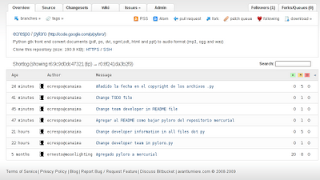
Finally, if you need team work support on a local network, the solution is to use the web server that comes built into mercurial:
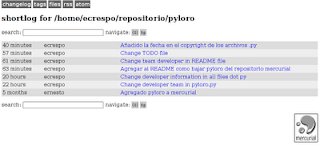
Simply run hg serve and open the browser at the machine's IP address on port 8000.
The following image shows the mercurial server running with the short log information.
===
Make a donation! If you liked this article you can donate with Bitcoin (BTC) using the digital wallet of your choice to the following address: 17MtNybhdkA9GV3UNS6BTwPcuhjXoPrSzV
Or by scanning the QR code from your wallet:
