This article explains the process of creating a tar.gz or tar.bz2 of the program that configures keyboard shortcuts through gconf with python. The following image shows the project repository on google code.
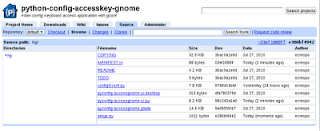
As the figure shows, the repository contains a series of files; each of them is explained below:
- COPYING: Contains the project license.
- MANIFEST.in: A template that contains the list of files that will be included in the program package.
- README: Contains information about the program, a description of its use and its requirements.
- TODO: List of things to do for the next versions of the program.
- *.py files: These are the programs that were developed.
- pyconfig-accessgnome-ui.desktop: File that defines the application's information in the desktop menu.
- pyconfig-accessgnome.glade : glade xml file that contains the graphical interface.
- setup.py: Configuration file for the installation and package creation process.
For practical purposes, MANIFEST.in and setup.py will be explained.
MANIFEST.in is an input template file that defines which files will be placed in the MANIFEST file; this final file will tell setup.py which files will be included in the .tar.gz or .tar.bz2 package. The file has an include directive where you list the files you want to include. For example:
include COPYING pyconfig-accessgnome.glade pyconfig-accessgnome-ui.desktop README TODOThe setup.py file contains the following:
!/usr/bin/env python
#importar setup de distutils
from distutils.core import setup
#Crear la variable data_files que contiene las rutas de donde se van a colocar los archivos.
data_files = [('share/applications',['pyconfig-accessgnome-ui.desktop']),
    ('share/python-config-accesskey-gnome',['COPYING','configGconf.py','pyconfig-accessgnome.glade','pyconfig-accessgnome-ui.py','README','TODO'])]


#se define el nombre del programa, la versión, una descripción corta, el autor y su correo,
#el url del proyecto, la licencia, los scripts principales del programa, los archivos de datos adicionales,
#La plataforma soportadas,los módulos que se requieren para el funcionamiento del programa.
#Y el módulo que se desarrollo y necesita el programa principal.


setup(name='python-gconf-keybinding',
      version='0.4',
      description='Allow config keyboard access application with gconf',
      author='Ernesto Nadir Crespo Avila',
      author_email='ecrespo@gmail.com',
      url = 'http://code.google.com/p/python-config-accesskey-gnome/',
      license = "GPL v3",
      scripts = ['pyconfig-accessgnome-ui.py', 'configGconf.py'],
      data_files =data_files,
      platforms=['i386','AMD64'],
      requires = ['gtk','gconf','pygtk','gtk.glade'],
      py_modules = ['configGconf']
      )
Once you have the files needed to install the program and to create the packages, all that is left is to run the commands: List the existing files:
ls -l
total 92
-rwxr-xr-x 1 ernesto ernesto  8036 ago  7 17:49 configGconf.py
-rw-r--r-- 1 ernesto ernesto 33353 jul 27 20:41 COPYING
-rw-r--r-- 1 ernesto ernesto    88 ago  8 18:15 MANIFEST.in
-rw-r--r-- 1 ernesto ernesto 14729 jul 27 20:45 pyconfig-accessgnome.glade
-rwxr-xr-x 1 ernesto ernesto   315 jul 27 20:41 pyconfig-accessgnome-ui.desktop
-rwxr-xr-x 1 ernesto ernesto  8420 ago  8 17:06 pyconfig-accessgnome-ui.py
-rw-r--r-- 1 ernesto ernesto  4260 jul 27 20:41 README
-rwxr-xr-x 1 ernesto ernesto  1021 ago  8 18:12 setup.py
-rw-r--r-- 1 ernesto ernesto     0 jul 27 20:41 TODO
Test the program installation: Run install for setup.
sudo python setup.py install
running install
running build
running build_py
creating build
creating build/lib.linux-i686-2.6
copying configGconf.py -> build/lib.linux-i686-2.6
running build_scripts
creating build/scripts-2.6
copying and adjusting pyconfig-accessgnome-ui.py -> build/scripts-2.6
copying and adjusting configGconf.py -> build/scripts-2.6
changing mode of build/scripts-2.6/pyconfig-accessgnome-ui.py from 644 to 755
changing mode of build/scripts-2.6/configGconf.py from 644 to 755
running install_lib
running install_scripts
copying build/scripts-2.6/pyconfig-accessgnome-ui.py -> /usr/local/bin
copying build/scripts-2.6/configGconf.py -> /usr/local/bin
changing mode of /usr/local/bin/pyconfig-accessgnome-ui.py to 755
changing mode of /usr/local/bin/configGconf.py to 755
running install_data
running install_egg_info
Removing /usr/local/lib/python2.6/dist-packages/python_gconf_keybinding-0.4.egg-info
Writing /usr/local/lib/python2.6/dist-packages/python_gconf_keybinding-0.4.egg-info
This creates a build directory containing the scripts and libraries, then copies them to /usr/local/, both to bin and to share.
ls share/python-config-accesskey-gnome/
configGconf.py  COPYING  pyconfig-accessgnome.glade  pyconfig-accessgnome-ui.py  README  TODO

ls bin/
configGconf.py  pyconfig-accessgnome-ui.py  pyloro.py
At this point you can already run the program, both graphically and from the command line.
Next comes the process of building the tar.gz and tar.bz: The setup.py command is sdist, which creates the package to be distributed; additionally, the format is passed with the option --formats=bztar, gztar. The bztar and gztar arguments create a tar.bz2 and a tar.gz respectively.
The command is the following:
python setup.py sdist --formats=bztar,gztar
running sdist
reading manifest template 'MANIFEST.in'
writing manifest file 'MANIFEST'
creating python-gconf-keybinding-0.4
making hard links in python-gconf-keybinding-0.4...
hard linking COPYING -> python-gconf-keybinding-0.4
hard linking README -> python-gconf-keybinding-0.4
hard linking TODO -> python-gconf-keybinding-0.4
hard linking configGconf.py -> python-gconf-keybinding-0.4
hard linking pyconfig-accessgnome-ui.desktop -> python-gconf-keybinding-0.4
hard linking pyconfig-accessgnome-ui.py -> python-gconf-keybinding-0.4
hard linking pyconfig-accessgnome.glade -> python-gconf-keybinding-0.4
hard linking setup.py -> python-gconf-keybinding-0.4
creating dist
tar -cf dist/python-gconf-keybinding-0.4.tar python-gconf-keybinding-0.4
bzip2 -f9 dist/python-gconf-keybinding-0.4.tar
tar -cf dist/python-gconf-keybinding-0.4.tar python-gconf-keybinding-0.4
gzip -f9 dist/python-gconf-keybinding-0.4.tar
removing 'python-gconf-keybinding-0.4' (and everything under it)
Now there is a dist directory with the 2 packages created:
ls -l dist/
total 40
-rw-r--r-- 1 ernesto ernesto 16539 ago  8 19:12 python-gconf-keybinding-0.4.tar.bz2
-rw-r--r-- 1 ernesto ernesto 18331 ago  8 19:12 python-gconf-keybinding-0.4.tar.gz
The contents of a package are the following:
tar -tvzf dist/python-gconf-keybinding-0.4.tar.gz
drwxr-xr-x ernesto/ernesto   0 2010-08-08 19:12 python-gconf-keybinding-0.4/
-rwxr-xr-x ernesto/ernesto 8420 2010-08-08 17:06 python-gconf-keybinding-0.4/pyconfig-accessgnome-ui.py
-rw-r--r-- ernesto/ernesto 33353 2010-07-27 20:41 python-gconf-keybinding-0.4/COPYING
-rwxr-xr-x ernesto/ernesto  8036 2010-08-07 17:49 python-gconf-keybinding-0.4/configGconf.py
-rw-r--r-- ernesto/ernesto     0 2010-07-27 20:41 python-gconf-keybinding-0.4/TODO
-rwxr-xr-x ernesto/ernesto   315 2010-07-27 20:41 python-gconf-keybinding-0.4/pyconfig-accessgnome-ui.desktop
-rwxr-xr-x ernesto/ernesto  1021 2010-08-08 18:12 python-gconf-keybinding-0.4/setup.py
-rw-r--r-- ernesto/ernesto 14729 2010-07-27 20:45 python-gconf-keybinding-0.4/pyconfig-accessgnome.glade
-rw-r--r-- ernesto/ernesto  4260 2010-07-27 20:41 python-gconf-keybinding-0.4/README
-rw-r--r-- ernesto/ernesto   394 2010-08-08 19:12 python-gconf-keybinding-0.4/PKG-INFO
All that is left is to test the package installation: first unpack it, then run setup.py with the install option:
tar -xvzf python-gconf-keybinding-0.4.tar.gz
python-gconf-keybinding-0.4/
python-gconf-keybinding-0.4/pyconfig-accessgnome-ui.py
python-gconf-keybinding-0.4/COPYING
python-gconf-keybinding-0.4/configGconf.py
python-gconf-keybinding-0.4/TODO
python-gconf-keybinding-0.4/pyconfig-accessgnome-ui.desktop
python-gconf-keybinding-0.4/setup.py
python-gconf-keybinding-0.4/pyconfig-accessgnome.glade
python-gconf-keybinding-0.4/README
python-gconf-keybinding-0.4/PKG-INFO
Change to the python-gconf-keybinding-0.4 directory.
cd python-gconf-keybinding-0.4/ Package installation:
sudo python setup.py install
running install
running build
running build_py
creating build
creating build/lib.linux-i686-2.6
copying configGconf.py -> build/lib.linux-i686-2.6
running build_scripts
creating build/scripts-2.6
copying and adjusting pyconfig-accessgnome-ui.py -> build/scripts-2.6
copying and adjusting configGconf.py -> build/scripts-2.6
changing mode of build/scripts-2.6/pyconfig-accessgnome-ui.py from 644 to 755
changing mode of build/scripts-2.6/configGconf.py from 644 to 755
running install_lib
running install_scripts
copying build/scripts-2.6/pyconfig-accessgnome-ui.py -> /usr/local/bin
copying build/scripts-2.6/configGconf.py -> /usr/local/bin
changing mode of /usr/local/bin/pyconfig-accessgnome-ui.py to 755
changing mode of /usr/local/bin/configGconf.py to 755
running install_data
running install_egg_info
Removing /usr/local/lib/python2.6/dist-packages/python_gconf_keybinding-0.4.egg-info
Writing /usr/local/lib/python2.6/dist-packages/python_gconf_keybinding-0.4.egg-info
As explained before, the program is installed in /usr/local .
The next article will explain how to create a Debian package from the tar.gz.
For more information you can visit the following links:
http://docs.python.org/distutils/ (broken link)
http://mundogeek.net/archivos/2008/09/23/distribuir-aplicaciones-python/
===
Make a donation! If you liked the article you can make a donation with Bitcoin (BTC) using the digital wallet of your choice to the following address: 17MtNybhdkA9GV3UNS6BTwPcuhjXoPrSzV
Or by scanning the QR code from your wallet:
