You can check the original article here.
The repository with the code is on gitlab, branch json1.
You can check the articles about Flask at the link to articles about flask.
Dockerfile
The Dockerfile is the following:
FROM python

WORKDIR /code


RUN pip3 install --upgrade pip

RUN pip3 install  flask

EXPOSE 5000


ADD . /code

CMD python app.py
The only change with respect to the Flask tutorial series is that it runs app.py instead of run.py; several package dependencies were removed to simplify the application.
docker-compose.yml file
In the docker-compose.yml file the name of the image is changed; the code of the file is below:
tutorial-json1:


  build: .


  ports:


   - "5000:5000"


  volumes:


   - .:/code
app.py file
The only change in the app.py file with respect to the previous article is that it starts run in debug mode and is given the ip 0.0.0.0 so that it works from the container; the code is below:
#!/usr/bin/env python


#Se importa de flask a Flask, jsonify y json


from flask import Flask,jsonify,json


#Se crea la instancia de la aplicacion


app = Flask(__name__)


#Se tiene una lista de nombres


lista = ["John Doe","Jane Doe"]


#Se crea


#Se define el decorador route donde se da la ruta del servidor web.


@app.route("/ListaEmpleados")


def ListaEmpleados():


    try:


        #inicializar la lista de empleados


        listaEmpleados = []


        #crear instancias para llenar la lista


        for i  in lista:


            datos = i.split(" ")


            listaEmpleados.append({'nombre': datos[0],'apellido': datos[1]})


        # convertir en dato json al diccionario


        jsonStr = json.dumps(listaEmpleados)


    except (Exception ,e):


        print (str(e))


    #Retorna el json


    return jsonify(Empleados=jsonStr)


if __name__ == '__main__':


    app.run(host="0.0.0.0",debug=True)
Execution
Now the image is built and the Docker container is run:
docker-compose build
docker-compose up
When opening the browser at the address http://localhost:5000/ListaEmpleados you get the image below:
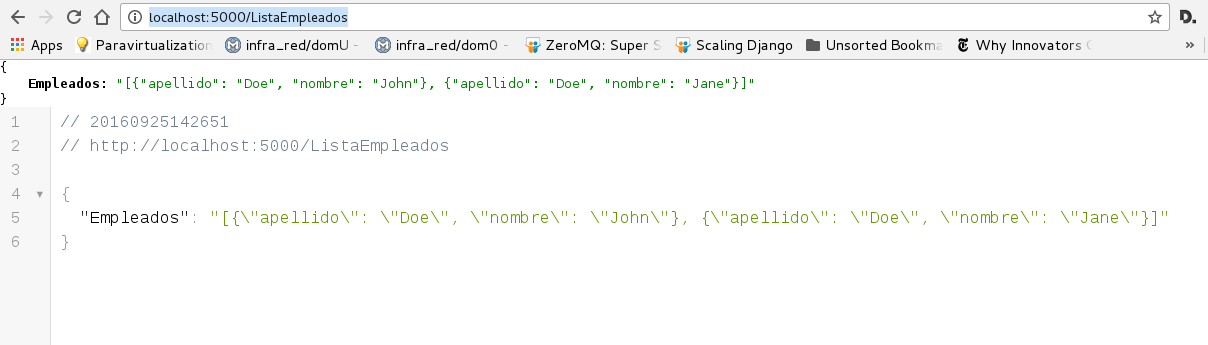
The image shows the json in the browser.
The output of running the container is the following:
Creating tutorialflask_tutorial-json1_1
Attaching to tutorialflask_tutorial-json1_1
tutorial-json1_1 |  * Running on http://0.0.0.0:5000/ (Press CTRL+C to quit)
tutorial-json1_1 |  * Restarting with stat
tutorial-json1_1 |  * Debugger is active!
tutorial-json1_1 |  * Debugger pin code: 733-227-386
tutorial-json1_1 | 172.17.0.1 - - [25/Sep/2016 18:44:22] "GET /ListaEmpleados HTTP/1.1" 200 -
In the next article we will work more with the json, as mentioned in the original article.
Make a donation! If you liked the article you can make a donation with Bitcoin (BTC) using the digital wallet of your choice to the following address: 17MtNybhdkA9GV3UNS6BTwPcuhjXoPrSzV
Or by scanning the QR code from your wallet:
