You can review the previous articles about the Flask microframework at the following link.
This article is based on an English article titled: How to create JSON in Python flask (broken link).
You can find the code for this article on gitlab at the following link.
The idea is to create JSON data from a dictionary that holds a list of employees, and publish it on the web using flask.
The code of app.py is shown below:
#!/usr/bin/env python

#Se importa de flask a Flask, jsonify y json

from flask import Flask,jsonify,json

#Se crea la instancia de la aplicacion

app = Flask(__name__)

#Se tiene una lista de nombres

lista = ["John Doe","Jane Doe"]


#Se crea


#Se define el decorador route donde se da la ruta del servidor web.

@app.route("/ListaEmpleados")

def ListaEmpleados():


    try:

     #inicializar la lista de empleados

     listaEmpleados = []


     #crear instancias para llenar la lista

     for i  in lista:

      datos = i.split(" ")

      listaEmpleados.append({'nombre': datos[0],'apellido': datos[1]})

        # convertir en dato json al diccionario

        jsonStr = json.dumps(listaEmpleados)


    except Exception ,e:

        print str(e)


    #Retorna el json


    return jsonify(Empleados=jsonStr)


if __name__ == '__main__':

 app.run()
Now run:
python app.pyOpen the browser at http://localhost:5000/ListaEmpleados .
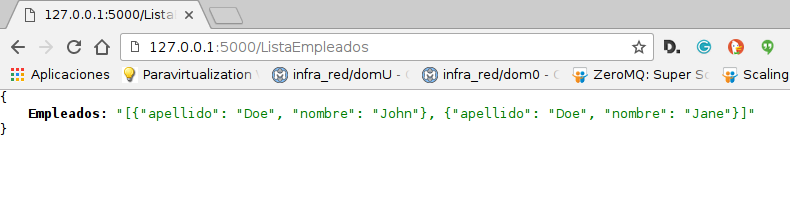
The following figure shows what the browser returns:
The next article continues with the part about working with the json.
Make a donation! If you liked the article you can make a donation with Bitcoin (BTC) using the digital wallet of your choice to the following address: 17MtNybhdkA9GV3UNS6BTwPcuhjXoPrSzV
Or by scanning the QR code from your wallet:
