As I mentioned in the previous article, I will start a series of articles about different applications for connecting to the internet from a mobile phone.
The first application is called proxoid, an http proxy, and you can find the application's site at the following link (broken link).
The general installation guide can be found here and the one dedicated to Linux here.
- The first thing to do is download the proxoid program from the Android market.
- Once the program is installed, udev is configured on Linux and the SDK is downloaded to use adb, as explained in this article.
- Create the tunnel. Run adb to forward the packets; the command is the following:
adb forward tcp:8080 tcp:8080
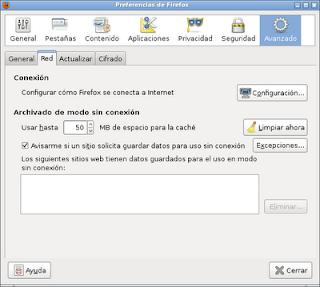
- Configure the browser to use the proxy. Open the firefox preferences as shown in the figure (in the network tab, click the settings button):
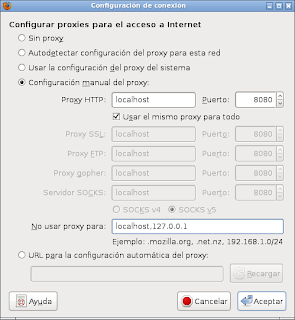
When you press settings, the proxy is added as localhost and port 8080, as shown in the following figure:
- Start proxoid on the phone. Simply run proxoid and then press start
- When visiting whatismyip.com it will show that the IP the browser uses for the internet is 201.240.16.229, and that the computer has a different IP from the one the browser shows.
===
Make a donation! If you liked the article you can make a donation with Bitcoin (BTC) using the digital wallet of your choice to the following address: 17MtNybhdkA9GV3UNS6BTwPcuhjXoPrSzV
Or by scanning the QR code from your wallet:
