This article explains how to run Apache Spark using a Docker container, instead of using the Spark installation procedure (installing java, scala and spark).
Apache Spark provides an interface for programming entire clusters with implicit data parallelism and fault tolerance. Its architecture is based on the so-called RDD (Resilient Distributed Dataset, a read-only set of data distributed across a cluster of machines that is kept in a fault-tolerant environment).
It can be considered a general-purpose, speed-oriented cluster computing system; it provides APIs in Java, Scala, Python and R. It also provides an optimized engine that supports graph execution.
It also supports a series of high-level tools such as:
- Spark SQL (for SQL-based structured data processing).
- MLlib for implementing machine learning.
- GraphX for graph processing.
- Spark Streaming.
More information on wikipedia.
The docker image to be used is gettyimages/spark and the one from github.
- Download the docker image:
docker pull gettyimages/spark- Download the
gettyimages/sparkrepository from github in order to usedocker-compose:
git clone https://github.com/gettyimages/docker-spark.git- Change to the
docker-sparckdirectory:
cd docker-spark 4 Dockerfile file:
FROM debian:stretch
MAINTAINER Getty Images "https://github.com/gettyimages"

RUN apt-get update \
 && apt-get install -y locales \
 && dpkg-reconfigure -f noninteractive locales \
 && locale-gen C.UTF-8 \
 && /usr/sbin/update-locale LANG=C.UTF-8 \
 && echo "en_US.UTF-8 UTF-8" >> /etc/locale.gen \
 && locale-gen \
 && apt-get clean \
 && rm -rf /var/lib/apt/lists/*

# Users with other locales should set this in their derivative image
ENV LANG en_US.UTF-8
ENV LANGUAGE en_US:en
ENV LC_ALL en_US.UTF-8

RUN apt-get update \
 && apt-get install -y curl unzip \
    python3 python3-setuptools \
 && ln -s /usr/bin/python3 /usr/bin/python \
 && easy_install3 pip py4j \
 && apt-get clean \
 && rm -rf /var/lib/apt/lists/*

# http://blog.stuart.axelbrooke.com/python-3-on-spark-return-of-the-pythonhashseed
ENV PYTHONHASHSEED 0
ENV PYTHONIOENCODING UTF-8
ENV PIP_DISABLE_PIP_VERSION_CHECK 1

# JAVA
ARG JAVA_MAJOR_VERSION=8
ARG JAVA_UPDATE_VERSION=131
ARG JAVA_BUILD_NUMBER=11
ENV JAVA_HOME /usr/jdk1.${JAVA_MAJOR_VERSION}.0_${JAVA_UPDATE_VERSION}

ENV PATH $PATH:$JAVA_HOME/bin
RUN curl -sL --retry 3 --insecure \
  --header "Cookie: oraclelicense=accept-securebackup-cookie;" \
  "http://download.oracle.com/otn-pub/java/jdk/${JAVA_MAJOR_VERSION}u${JAVA_UPDATE_VERSION}-b${JAVA_BUILD_NUMBER}/d54c1d3a095b4ff2b6607d096fa80163/server-jre-${JAVA_MAJOR_VERSION}u${JAVA_UPDATE_VERSION}-linux-x64.tar.gz" \
  | gunzip \
  | tar x -C /usr/ \
  && ln -s $JAVA_HOME /usr/java \
  && rm -rf $JAVA_HOME/man

# HADOOP
ENV HADOOP_VERSION 3.0.0
ENV HADOOP_HOME /usr/hadoop-$HADOOP_VERSION
ENV HADOOP_CONF_DIR=$HADOOP_HOME/etc/hadoop
ENV PATH $PATH:$HADOOP_HOME/bin
RUN curl -sL --retry 3 \
  "http://archive.apache.org/dist/hadoop/common/hadoop-$HADOOP_VERSION/hadoop-$HADOOP_VERSION.tar.gz" \
  | gunzip \
  | tar -x -C /usr/ \
 && rm -rf $HADOOP_HOME/share/doc \
 && chown -R root:root $HADOOP_HOME

# SPARK
ENV SPARK_VERSION 2.3.0
ENV SPARK_PACKAGE spark-${SPARK_VERSION}-bin-without-hadoop
ENV SPARK_HOME /usr/spark-${SPARK_VERSION}
ENV SPARK_DIST_CLASSPATH="$HADOOP_HOME/etc/hadoop/*:$HADOOP_HOME/share/hadoop/common/lib/*:$HADOOP_HOME/share/hadoop/common/*:$HADOOP_HOME/share/hadoop/hdfs/*:$HADOOP_HOME/share/hadoop/hdfs/lib/*:$HADOOP_HOME/share/hadoop/hdfs/*:$HADOOP_HOME/share/hadoop/yarn/lib/*:$HADOOP_HOME/share/hadoop/yarn/*:$HADOOP_HOME/share/hadoop/mapreduce/lib/*:$HADOOP_HOME/share/hadoop/mapreduce/*:$HADOOP_HOME/share/hadoop/tools/lib/*"
ENV PATH $PATH:${SPARK_HOME}/bin
RUN curl -sL --retry 3 \
  "https://www.apache.org/dyn/mirrors/mirrors.cgi?action=download&filename=spark/spark-${SPARK_VERSION}/${SPARK_PACKAGE}.tgz" \
  | gunzip \
  | tar x -C /usr/ \
 && mv /usr/$SPARK_PACKAGE $SPARK_HOME \
 && chown -R root:root $SPARK_HOME

WORKDIR $SPARK_HOME
CMD ["bin/spark-class", "org.apache.spark.deploy.master.Master"]- The docker-compose.yml file:
master:
  image: gettyimages/spark
  command: bin/spark-class org.apache.spark.deploy.master.Master -h master
  hostname: master
  environment:
    MASTER: spark://master:7077
    SPARK_CONF_DIR: /conf
    SPARK_PUBLIC_DNS: localhost
  expose:
    - 7001
    - 7002
    - 7003
    - 7004
    - 7005
    - 7006
    - 7077
    - 6066
  ports:
    - 4040:4040
    - 6066:6066
    - 7077:7077
    - 9080:8080
  volumes:
    - ./conf/master:/conf
    - ./data:/tmp/data

worker:
  image: gettyimages/spark
  command: bin/spark-class org.apache.spark.deploy.worker.Worker spark://master:7077
  hostname: worker
  environment:
    SPARK_CONF_DIR: /conf
    SPARK_WORKER_CORES: 2
    SPARK_WORKER_MEMORY: 1g
    SPARK_WORKER_PORT: 8881
    SPARK_WORKER_WEBUI_PORT: 8081
    SPARK_PUBLIC_DNS: localhost
  links:
    - master
  expose:
    - 7012
    - 7013
    - 7014
    - 7015
    - 7016
    - 8881
  ports:
    - 8081:8081
  volumes:
    - ./conf/worker:/conf
    - ./data:/tmp/data
- Run
docker-compose up:
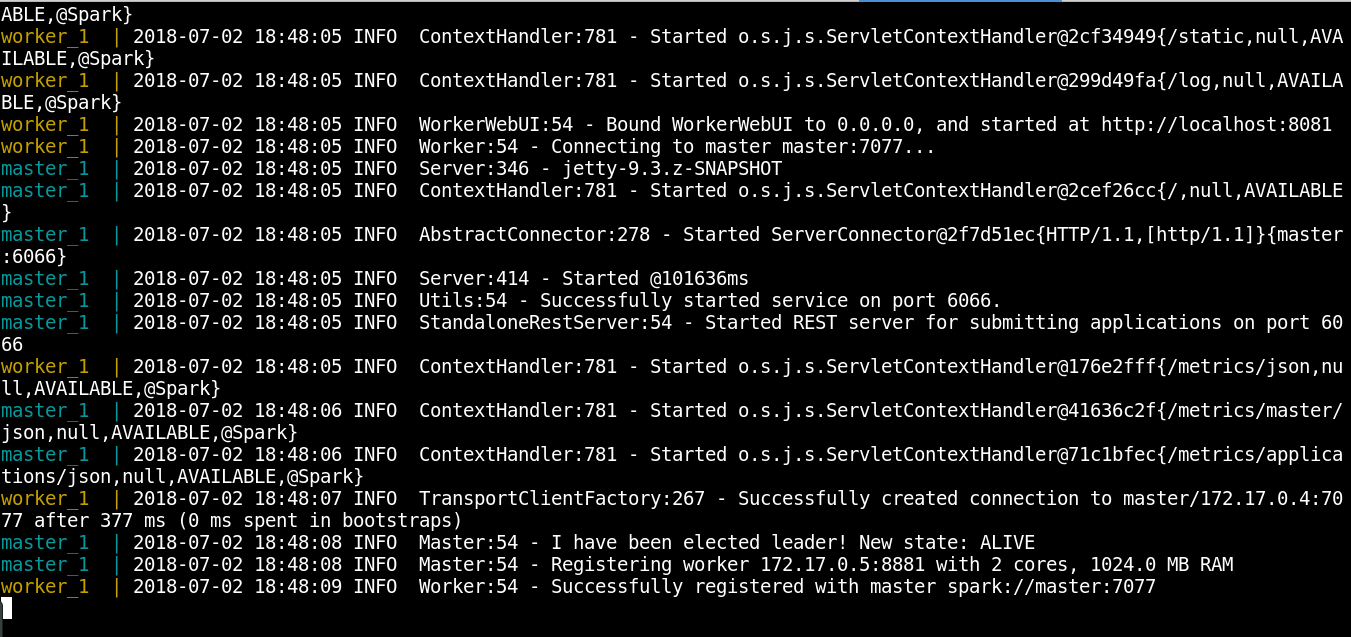
docker-compose up- The container execution is shown below:
- View the processes:
docker-compose ps - The result is shown below:
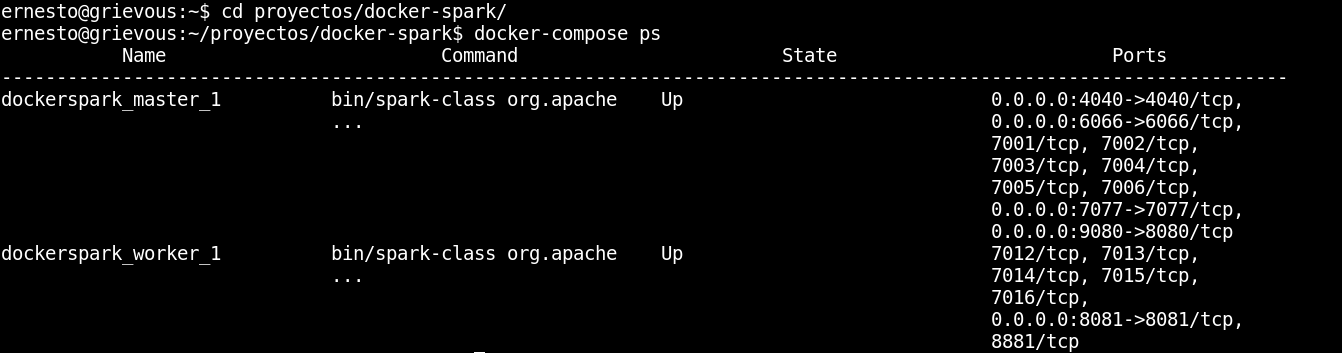
Two containers are running: one is the master, which has port 4040 open, among other ports, and the other container is the worker.
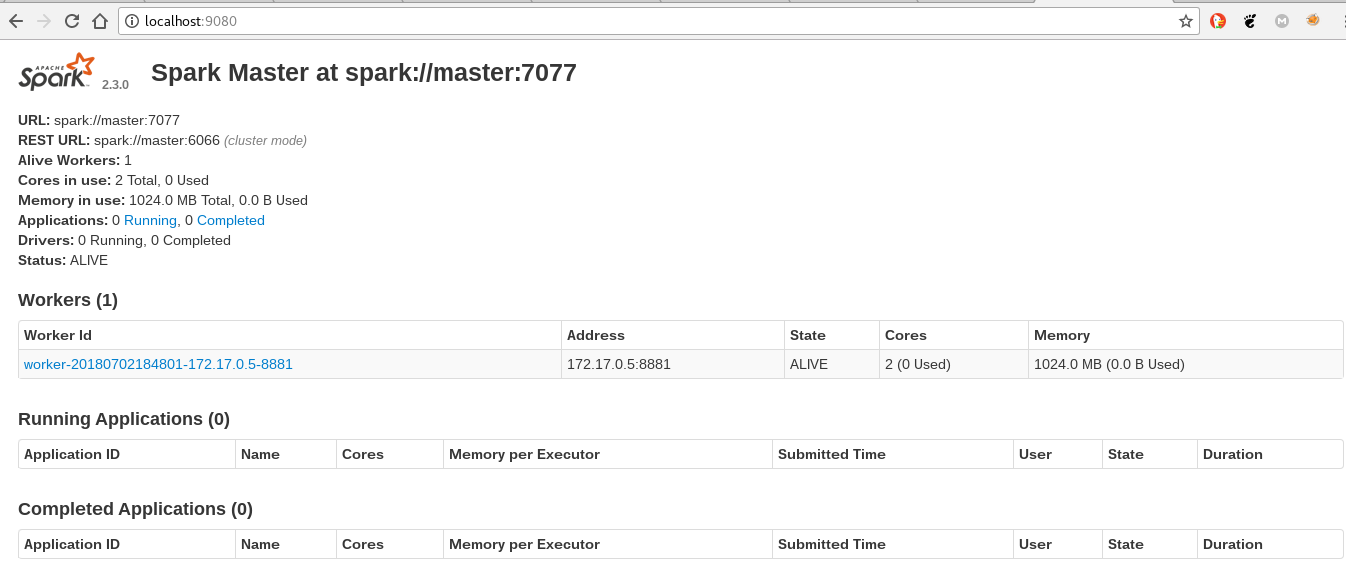
- Open the browser at http://localhost:9080; a browser screenshot is shown below:
- Run
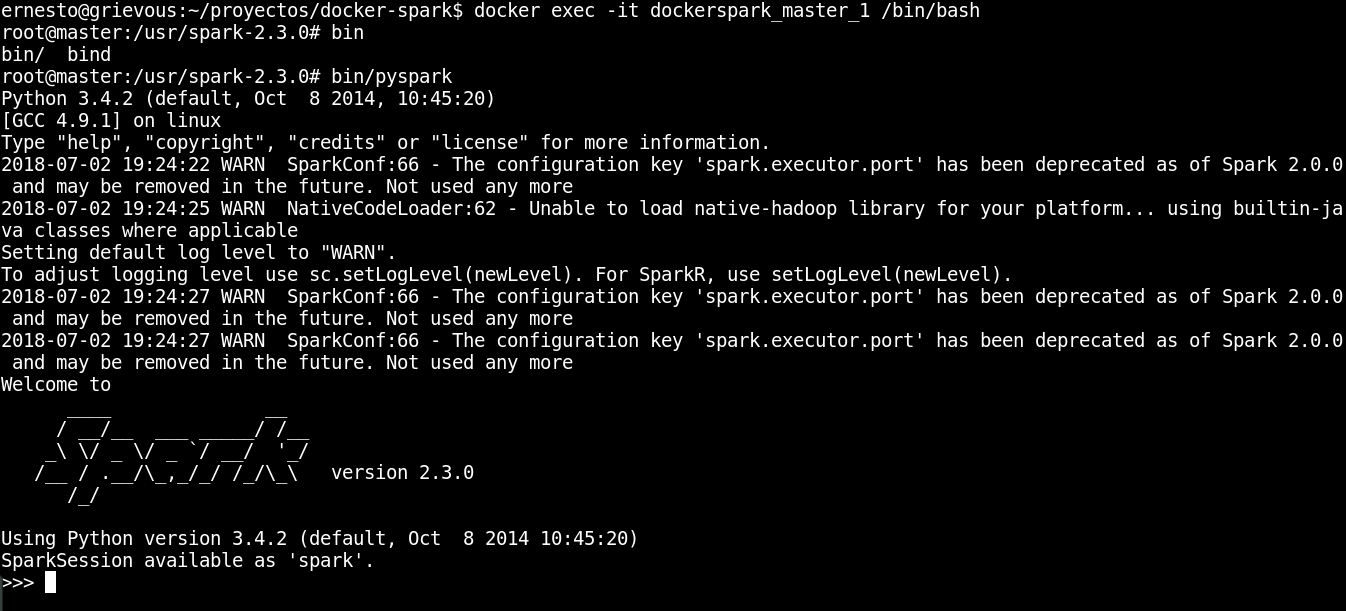
pysparkby executing inside the master container:
docker exec -it dockerspark_master_1 /bin/bash11.1 Inside the container run pyspark:
bin/pysparkThe execution is shown below:
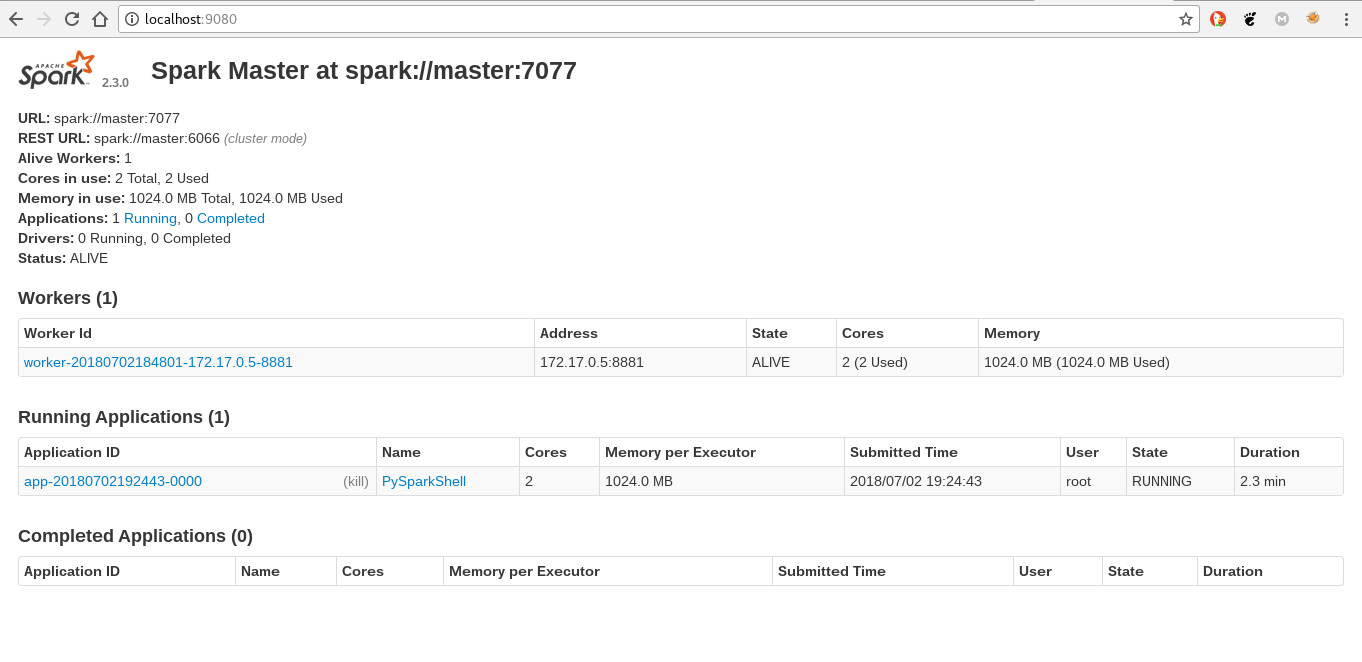
11.2 When opening the browser, an application is running on spark:
- Finally, run
SparkPifrom the master container:
12.1 Enter the master container:
docker exec -it dockerspark_master_1 /bin/bash12.2 Run SparkPi
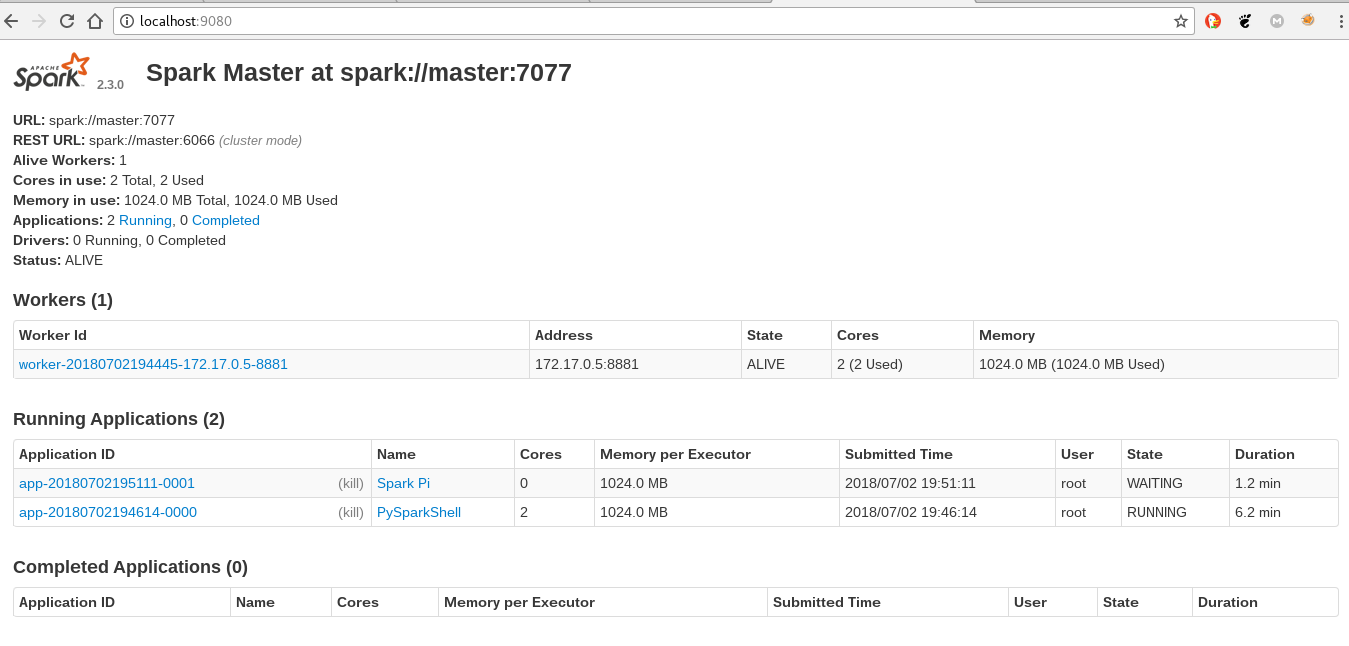
bin/run-example SparkPi 1012.3 The execution of the SparkPi application is shown:
In the next article spark will be used through pyspark.
Make a donation! If you liked the article you can make a donation with Bitcoin (BTC) using the digital wallet of your choice to the following address: 17MtNybhdkA9GV3UNS6BTwPcuhjXoPrSzV
Or by scanning the QR code from your wallet:
