This post is based on the English-language article by Matt Cutts, where he builds the barcode reader in 6 lines of code. You can find the link to his blog here.
Below is the code needed to search the internet for a barcode captured with the phone's camera:
#Importar modulo android
import android
#Instanciar el objeto Android
droid = android.Android()
#Llama al lector de código de barras del celular, se captura el código ISBN
# y se abre un navegador en google books para buscar ese código
droid.startActivity('android.intent.action.VIEW', "http://books.google.com?q=%d" %int(droid.scanBarcode()[1]['extras']['SCAN_RESULT']))
Without the comments at the end, the script has only 3 lines of code to search the internet for books using the barcode captured from the camera.
But it is better to break the last line of code into several lines for a detailed explanation of what it does:
#Importar modulo android
import android
#Instanciar el objeto Android
droid = android.Android()
#Escanear el codigo de barra por medio de la camara del celular, code guarda una lista
code = droid.scanBarcode()
#Capturar el isbn del diccionario que contiene la lista
#La lista tiene 3 elementos y el número 1 contiene un diccionario.
#El diccionario contiene el formato del código de barras y el isbn.
#Luego ese código se convierte de utf8 a int
isbn = int(code[1]['extras']['SCAN_RESULT'])
#Crea el url completo para realizar la busqueda del isbn
url = "http://books.google.com?q=%d" %isbn
#Inicia la busqueda del isbn en google abriendo un navegador
droid.startActivity('android.intent.action.VIEW', url)
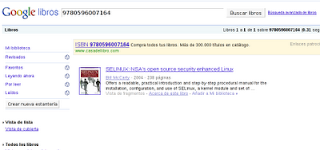
When the barcode is scanned from the phone, a browser window opens to search books.google.com for the captured ISBN.
The following figure shows the search result.
===
Make a donation! If you liked the article you can make a donation with Bitcoin (BTC) using the digital wallet of your choice to the following address: 17MtNybhdkA9GV3UNS6BTwPcuhjXoPrSzV
Or by scanning the QR code from your wallet:
