This article shows how to create an asynchronous REST API using aiohttp. A script will be used to access the NoSQL database RethinkDB asynchronously, and there are 3 ways to validate the API's data input: the first checks each variable, the second uses cerberus with a schema of the input data and, finally, the third uses cerberus but with the schema stored in rethinkdb.
The repository with the complete code of this tutorial is on github.
This article is based on the article Using Data Validation for Robust APIs and on the article How to create REST API using aiohttp, which explains how to make a synchronous REST API with aiohttp.
You can see the cerberus documentation at the following cerberus link.
The REST API has the following directory and file structure:
async-api-rest-example
├── app.py
├── README.md
├── resources
│   ├── api_resources.py
│   ├── home.py
│   ├── __init__.py
│   └── rethink_async.py
└── run.py
Description of the files:
- app.py: Defines the routes of the REST API endpoints.
- run.py: Script that runs the REST API.
- resources/rethin_async.py: Module that allows asynchronous access to rethinkdb.
- resources/home.py: Home page of the REST API.
- resources/api_resources.py: Where the HTTP methods of the REST API are defined.
Script run.py
This script starts the REST API; the code is shown below:
#!/usr/bin/env python3

#Se importa aiohttp
from aiohttp import web

#Se importa las rutas de los endpoint
from app import setup_routes


async def init_app():
    #Se instancia la aplicación
    app = web.Application()
    #A la aplicación se le pasa las rutas
    setup_routes(app)
    #Se retorna la aplicación
    return app


def main():
    #Se define la dirección del host, el puerto y se corre la Ap en dicha IP y puerto
    host = '0.0.0.0'
    port = 5000
    app = init_app()

    web.run_app(app,host=host, port=port)


if __name__ == '__main__':
    main()
Script app.py
This script defines the routes and URLs of the REST API endpoints. The code is shown below:
#Se importa los recursos del api rest y el home .
from resources.api_resources import Student
from resources.home import getIndex


def setup_routes(app):
    student = Student()
    #Se tiene 3 endpoints, el primero validación clásica,
    # el segundo validando con cerberus, y el 3ero con cerberus
    #pero guardando el esquema de validación en una base de datos
    app.router.add_post('/api/v1/student1',student.getData1)
    app.router.add_post('/api/v1/student2',student.getData2)
    app.router.add_post('/api/v1/student3',student.getData3)
    #Por seguridad no se permite ingresar a la raiz del API rest
    app.router.add_get('/api/v1/', getIndex)
    app.router.add_get('/', getIndex)
Script rethink_async.py
#!/usr/bin/env python3

import rethinkdb as r
import asyncio
from datetime import datetime


r.set_loop_type("asyncio")


async def createDB(server,port,database):
    """
    Create DB to database server.

    Parameters
    ----------
    server: IP server to connect
    port: Port server to connect
    database: Database name to create

    """
    conn = await r.connect(server, port)
    if database not in await r.db_list().run(conn):
        return await r.db_create(database).run(conn)


async def createTable(server,port,database,table):
    """
    Create Table in database.

    Parameters
    ----------
    server: IP server to connect
    port: Port server to connect
    database: Database name to connect
    """
    conn = await r.connect(server, port)
    return await r.db(database).table_create(table).run(conn)


async def listdb(server,port):
    """
    List all database in database server.


    Parameters
    ----------
    server: IP server to connect
    port: Port server to connect
    """
    conn = await r.connect(server, port)
    return await r.db_list(conn)


async def listtables(server,port,database):
    """
    Lista tables from database.

    Parameters
    ----------
    server: IP server to connect
    port: Port server to connect
    database: Database name to list tables
    """
    conn = await r.connect(server, port)
    return await r.db(database).table_list().run(conn)


async def insert(server,port,database,table,data):
    """
    Insert dictionary  in table.

    Parameters
    ----------
    server: IP server to connect
    port: Port server to connect
    database: Database name to connect
    table: table to insert Dictionary
    data: Dictionary data to insert
    """
    conn = await r.connect(server, port)
    result = await r.db(database).table(table).insert(data).run(conn)
    await conn.close()
    return result


async def getAll(server,port,database,table,pattern=None):
    """
    Get All documents from pattern search

    Parameters
    ----------
    server: IP server to connect
    port: Port server to connect
    database: Database name to connect
    table: table name to search
    pattern: Dictionary with pattern search
    """
    conn = await r.connect(server, port)
    if pattern == None:
        cursor = await r.db(database).table(table).run(conn)
    else:
        cursor = await r.db(database).table(table).filter(pattern).run(conn)
    elements = list()

    while (await cursor.fetch_next()):
        item = await cursor.next()
        elements.append(item)

    await conn.close()

    return elements


async def getFirst(server, port, database, table, pattern = None):
    """
    Get first document from pattern search

    Parameters
    ----------
    server: IP server to connect
    port: Port server to connect
    database: Database name to connect
    table: table name to search
    pattern: Dictionary with pattern search
    """
    conn = await r.connect(server, port)
    if pattern == None:
        cursor = await r.db(database).table(table).run(conn)
    else:
        cursor = await  r.db(database).table(table).filter(pattern).run(conn)
    elements = list()

    while (await  cursor.fetch_next()):
        item = await cursor.next()
        elements.append(item)
        break
    await conn.close()
    return elements


async def delete(server,port,database,table,pattern):
    """
    Delete a  document from pattern search

    Parameters
    ----------
    server: IP server to connect
    port: Port server to connect
    database: Database name to connect
    table: table name to search
    pattern: Dictionary with pattern search
    """
    conn = await r.connect(server, port)
    result =  await r.db(database).table(table).filter(pattern).delete().run(conn)
    await conn.close()
    return result


async def update(server,port,database,table,data,pattern=None):
    """
    Update a document from pattern search

    Parameters
    ----------
    server: IP server to connect
    port: Port server to connect
    database: Database name to connect
    table: table name to search
    pattern: Dictionary with pattern search
    """
    conn = await r.connect(server, port)
    if (type(data) == type(dict())):
        if pattern == None :
            result = await r.db(database).table(table).update(data).run(conn)
            await conn.close()
            return result
        else:
            result =  await r.db(database).table(table).filter(pattern).update(data).run(conn)
            await conn.close()
            return result
Script api_resouces.py
The script has 3 methods:
- getData1: This method validates each of the data inputs.
- getData2: This method validates the data input against a schema, validating with cerberus.
- getData3: This method uses cerberus again but now takes the schema to validate from rethinkdb.
The code is shown below:
import json
from aiohttp import web
from cerberus import Validator
import rethinkdb as r

from .rethink_async import *

__version__ = '0.0.1'


student_schema = {
    'uid': {
        'required': True,
        'type': 'integer',
    },
    'age': {
        'required': True,
        'type': 'integer',
        'min': 18,
        'max': 35,
    },
    'name': {
        'required': True,
        'type': 'string',
        'maxlength': 50,
    },
    'grade': {
        'required': False,
        'type': 'string',
        'allowed': ['A', 'B', 'C'],
    }
}


class Student(object):

    def __init__(self):
        pass

    async def getData1(self,request):

        #Se convierte el json a un diccionario

        try:
            data = json.loads(await request.text())
        except json.JSONDecodeError:
            response_obj = {'status': 'failed', 'reason': "Ill-formed JSON"}
            return web.Response(text=json.dumps(response_obj), status=205)

        #Se valida los datos de entrada
        try:
            uid = int(data['uid'])
        except (KeyError, ValueError):
            response_obj = {'status': 'failed', 'reason': "Expecting uid:int"}
            return web.Response(text=json.dumps(response_obj), status=205)

        try:
            age = int(data['age'])
            if not 18 < age < 35:
                raise ValueError('Bad age')
        except (KeyError, ValueError):
            response_obj = {'status': 'failed', 'reason': "Expecting age:int within the range [18:35]"}
            return web.Response(text=json.dumps(response_obj), status=205)

        try:
            name = str(data['name'])
            if len(name) > 50:
                raise ValueError('Max limit 50')
        except (KeyError, ValueError):
            response_obj = {'status': 'failed', 'reason': "Expecting name:str within the range [0:50]"}
            return web.Response(text=json.dumps(response_obj), status=205)

        try:
            grade = data.get('grade')
            if grade is None:
                grade = 'A'
            if grade not in ('A', 'B', 'C'):
                response_obj = {'status': 'failed', 'reason': "A, B or C expected"}
                return web.Response(text=json.dumps(response_obj), status=205)
        except (KeyError, ValueError):
            response_obj = {'status': 'failed', 'reason': "Expecting grade:str A, B or C expected"}
            return web.Response(text=json.dumps(response_obj), status=205)

        #Luego de validar se construye el diccionario de salida de datos como json

        data_output = dict()
        data_output['uid'] = data['uid']
        data_output['age'] = data['age']
        data_output['name'] = data['name']
        data_output['grade'] = data.get('grade', 'A')

        response_obj = {
            'status': 'success',
            'data': data_output
        }
        return web.Response(text=json.dumps(response_obj), status=200, content_type='application/json')


    async def getData2(self,request):

        #Se convierte el json del post en un diccionario
        try:
            data = json.loads(await request.text())
        except json.JSONDecodeError:
            response_obj = {'status': 'failed', 'reason': "Ill-formed JSON"}
            return web.Response(text=json.dumps(response_obj), status=205)

        #Con la variable que contiene el esquema se realiza la validación del json
        student_validator = Validator(student_schema)
        if not student_validator.validate(data):
            msg = student_validator.errors
            response_obj = {'status': 'failed', 'reason': msg}
            return web.Response(text=json.dumps(response_obj), status=205)

        #Se construye el diccionario de la salida de los datos vía json
        data_output = dict()
        data_output['uid'] = data['uid']
        data_output['age'] = data['age']
        data_output['name'] = data['name']
        data_output['grade'] = data.get('grade', 'A')

        response_obj = {
            'status': 'success',
            'data': data_output
        }
        return web.Response(text=json.dumps(response_obj), status=200, content_type='application/json')


    async def getData3(self,request):

        #Se convierte el json en un diccionario
        try:
            data = json.loads(await request.text())
        except json.JSONDecodeError:
            response_obj = {'status': 'failed', 'reason': "Ill-formed JSON"}
            return web.Response(text=json.dumps(response_obj), status=205)

        #Si yo se, no debería tener  la configuración de la base de datos acá,
        #pero era para no alargar el código de ejemplo
        #Se definen el servidor, puerto, base de datos, la tabla y el patrón de busqueda
        server = "localhost"
        port = 28015
        db = "student"
        table = "student_schema"
        pattern = {"endpoint": "student3"}

        #Se realiza la consulta a rethinkdb de manera asincrona
        student_schemadb = await getFirst(server, port, db, table, pattern)

        #Se quitan del diccionario el id y el endpoint a fin de realizar la evaluación del esquema
        student_schema = {item: student_schemadb[0][item] for item in list(student_schemadb[0].keys()) if item != 'id'}
        student_schema = {item: student_schema[item] for item in list(student_schema.keys()) if item != 'endpoint'}

        #Se valida el esquema con los datos suministrados vía post
        student_validator = Validator(student_schema)
        if not student_validator.validate(data):
            msg = student_validator.errors
            response_obj = {'status': 'failed', 'reason': msg}
            return web.Response(text=json.dumps(response_obj), status=205)

        #Se toman los datos y se colocan en el diccionario para el json de salida
        data_output = dict()
        data_output['uid'] = data['uid']
        data_output['age'] = data['age']
        data_output['name'] = data['name']
        data_output['grade'] = data.get('grade', 'A')

        response_obj = {
            'status': 'success',
            'data': data_output
        }
        return web.Response(text=json.dumps(response_obj), status=200, content_type='application/json')
rethinkdb database with the schema for cerberus
For the getData3 method to work, the schema must be stored in the rethinkdb database.
The process of installing rethinkDB via docker is covered in the following platzi article (broken link).
To insert the data, run the following command in the rethinkDB dashboard (http://localhost:8080):
r.db("student").table("student_schema").insert({id:1,endpoint: 'student3',uid: {
        'required': true,
        'type': 'integer'},
    age: {
        'required': true,
        'type': 'integer',
        'min': 18,
        'max': 35
    },
    name: {
        'required': true,
        'type': 'string',
        'maxlength': 50
    },
    grade: {
        'required': false,
        'type': 'string',
        'allowed': ['A', 'B', 'C']
  }})
That is how the data is inserted into the table.
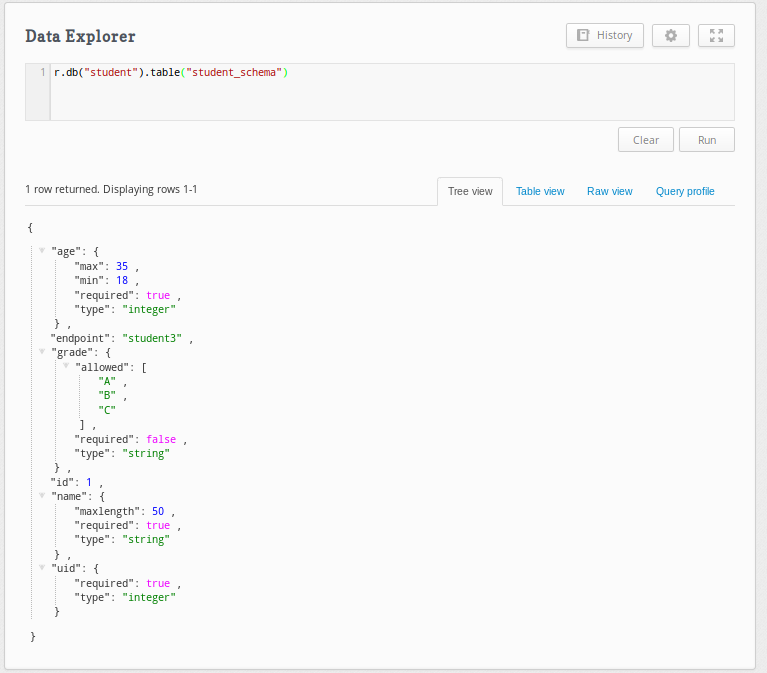
To query the table through the dashboard, run:
r.db("student").table("student_schema")The table is shown below:
Starting the REST API.
To start the REST API you need to have the rethinkdb and aiohttp libraries installed:
pip install rethinkdb aiohttpOnce installed, run the run.py script:
python run.py
If you get the following output, the REST API is running without problems:
======== Running on http://0.0.0.0:5000 ========
(Press CTRL+C to quit)
Querying the REST API
To query the REST API you can use insomnia or postman, both are REST API clients.
There are 3 endpoints, all using the post method, to which a json like the following will be passed:
{
  "uid": 42,
  "age": 25,
  "name": "John Doe",
  "grade": "A"
}
The URLs are the following:
- http://localhost:5000/api/v1/student1 : Uses the getData1 method.
- http://localhost:5000/api/v1/student2 : Uses the getData2 method.
- http://localhost:5000/api/v1/student3 : Uses the getData3 method.
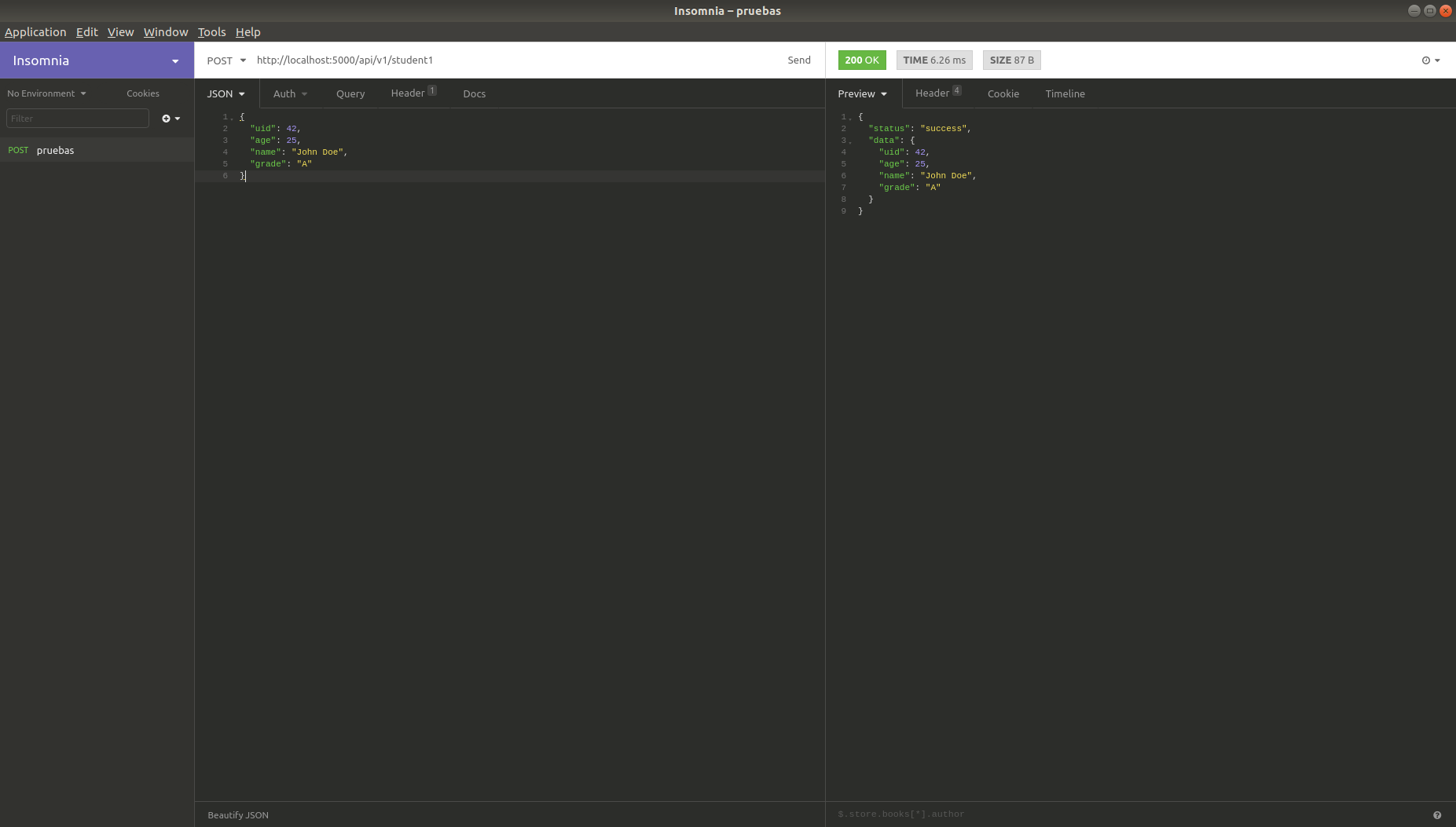
First endpoint:
The query is made with the json shown above:
Now, for example, the grade variable is changed to X:
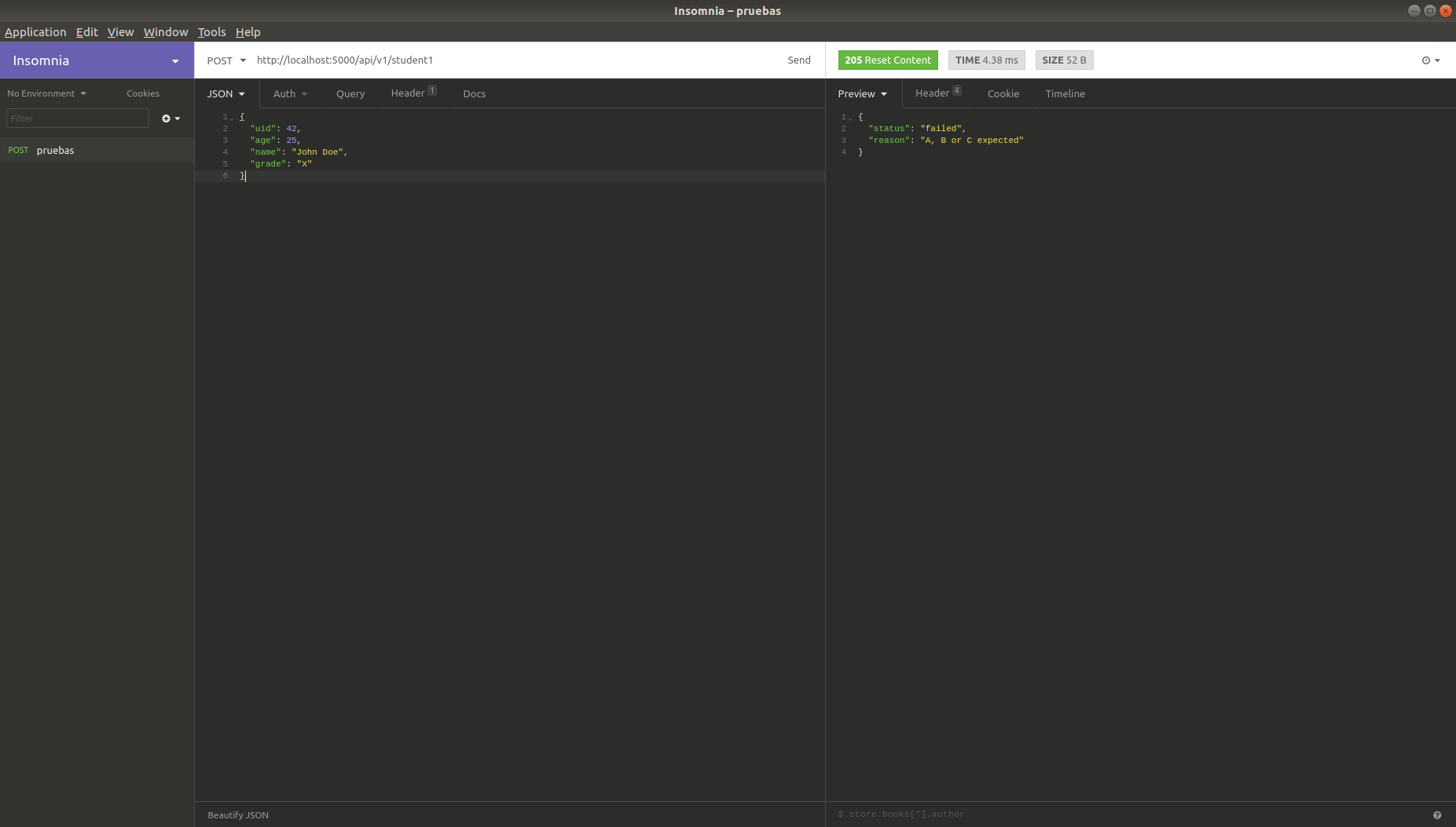
In this case the value X for the grade variable is not valid.
Second endpoint:
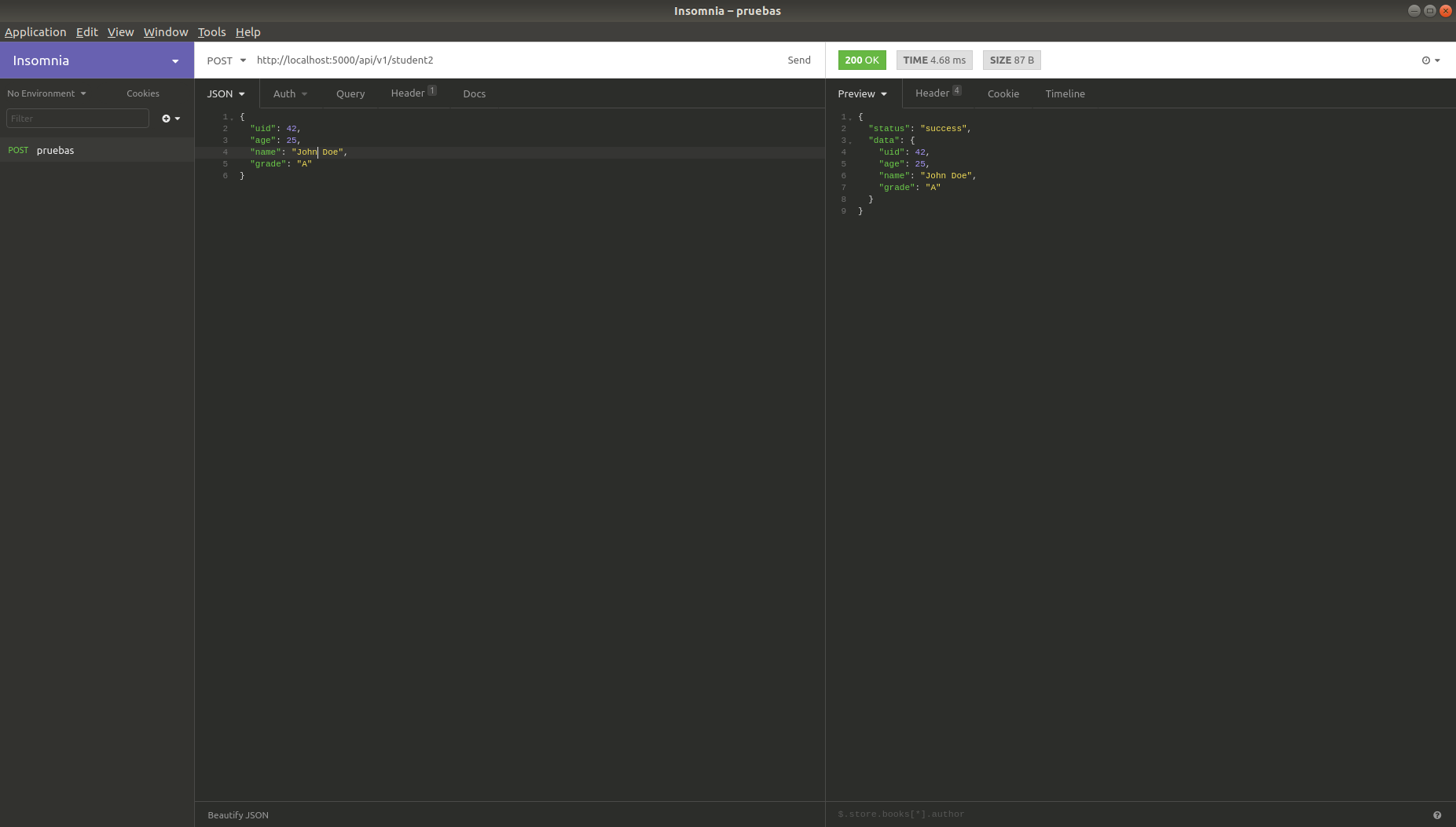
In this case cerberus is used with the variable that holds the schema to validate:
The query is made with the original json:
Now the query is made with the grade variable changed to the value Z:
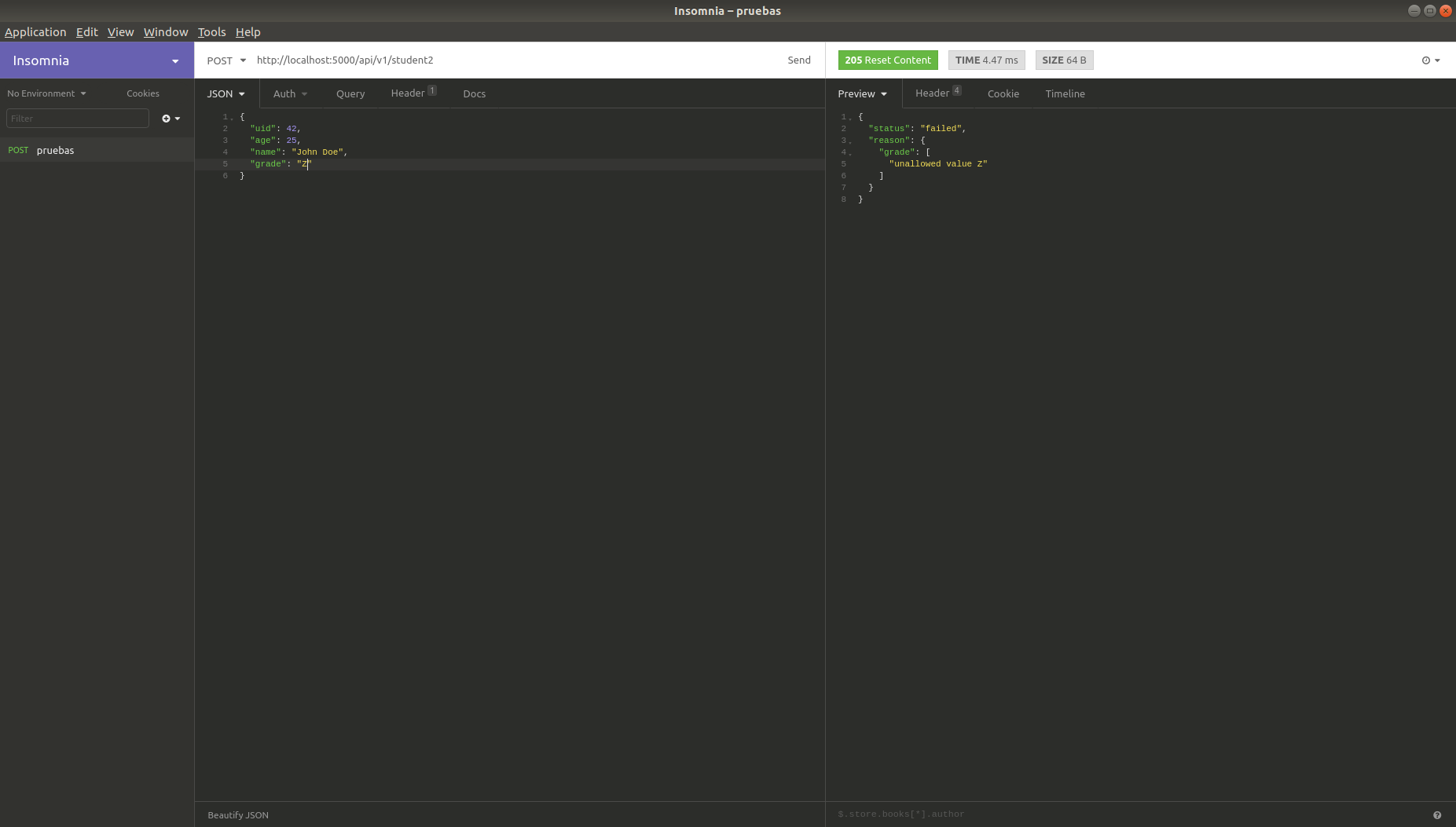
The message is more generic, not the one defined in the first method.
Third endpoint:
Here you will not see significant changes in the query; the interesting point is that, when you have many endpoints with different data inputs, it is best to use a database where each endpoint's schema is stored.
So the result would be the same as for the second endpoint.
Make a donation! If you liked the article you can make a donation with Bitcoin (BTC) using the digital wallet of your choice to the following address: 17MtNybhdkA9GV3UNS6BTwPcuhjXoPrSzV
Or by scanning the QR code from your wallet:
