The article on capturing funvisis seismic event data only dealt with ordering the data, but the information still needs to be stored in a database; that is the topic of this article.
There are now several modules:
sismux_getdata.py: The module that does the webscraping of the funvisis page.sismux_mongo.py: The module that implements a CRUD for mongoDB on MongoLab.sismux_main.py: The main module that queries the Funvisis page every 5 min to save the information in the database if it does not exist.sismux_apirest.py: The module that implements a REST API (next article).sismux_graphql.py: The module that implements an API with GraphQL (next article).
From the previous article the code of sismux_getdata.py is shown:
#!/usr/bin/env python3


#Se importa beautifulSoup

from bs4 import BeautifulSoup

#Se importa la fecha

import datetime

import requests

import sys

import json


class Sismo(object):

    def __init__(self,url="http://www.funvisis.gob.ve/",home="index.php",referer='http://www.cantv.com.ve'):

        headers = {'User-agent': 'Mozilla/5.0',\

            'SSL_VERIFYHOST': 'False',\

            'FRESH_CONNECT':'True',\

            'RETURNTRANSFER':'True',\

            'SSL_VERIFYPEER': 'False',\

            'Referer': referer

            }

        self.__url = url

        self.__home = home

        self.__urlhome = self.__url + self.__home

        self.__session = requests.Session()

        self.__session.headers.update(headers)


    def GetData(self):

        #Se  obtiene la pagina por medio de session.

        try:

            self.__r = self.__session.get(self.__urlhome)

            self.__page = self.__r.content

        except (requests.exceptions.SSLError):

            print("SSL Error")

            sys.exit(0)

        except (requests.exceptions.ConnectionError):

            print("Connection Error")

            sys.exit(0)

        #Se le pasa la pagina a beautifulsoup usando lxml de parser.

        self.__soup = BeautifulSoup(self.__page,"lxml")

        #Se crea el diccionario que almacena los datos

        self.__sismo = {}


        #SE obtiene el primer  div que tengan class module

        for row in self.__soup('div', {'class': 'module'})[0]:

            #Se obtiene el tag a para luego obtener el href y tener el url

            #del gif del sitio de funvisis que tiene la imagen del sitio donde

            #fue el sismo.

            trs = row.find('a')

            if trs == -1:

                continue

            self.__sismo['urlref'] = self.__url  + trs.get('href',None)


            trs = row.find('tr')

            if trs == -1:

                continue

            #Obtiene los datos del sismo del sitio de funvisis

            datos = trs.find('td').getText().split(' ')[0].split('\n\t')

            self.__sismo['fecha'] = datos[0].split('\xa0')[1]

            date = self.__sismo['fecha'].split("/")

            self.__sismo['hora'] = datos[2].split(" ")[-2]

            time= self.__sismo['hora'].split(":")

            self.__sismo['datetime'] = datetime.datetime(int(date[2]),int(date[1]),int(date[0]), int(time[0]), int(time[1]))

            self.__sismo['magnitud'] = datos[4].split(" ")[-1]

            mag = datos[6].split(" ")[-1].split('\xa0')

            self.__sismo['profundidad'] = mag[0] + " "+ mag[1]

            lat = datos[8].split(" ")

            self.__sismo["latitud"] = lat[-2] + " " + lat[-1]

            lon =  datos[10].split(" ")

            self.__sismo['longitud'] = lon[-2] + " "+ lon[-1]

            self.__sismo['epicentro'] = datos[11].split(":")[1].split('\xa0')[-1]

            self.__sismo['loc'] = {'type':'Point','coordinates' : [ float(lat[-2]) , float(lon[-2]) ]}

        return self.__sismo
The code of the sismux_mongo.py module is shown below:
#!/usr/bin/env python3
import pymongo

from pymongo import MongoClient


#Se define el uri de la conexion a mongolab

uri = 'mongodb://usuario:clave@ds045064.mlab.com:45064/basedatos'

#Se define la base de datos y la cole

#ccion


basedatos = "sismux"

coleccion = "sismos"


#Se crea la clase BaseDatos que simplemente implemente un crud.
class BaseDatos(object):

    #Se define la intancia de mongoclient, se define la base de datos y

    #la coleccion

    def __init__(self,uri=uri,basedatos=basedatos,coleccion=coleccion):

        self.__client = MongoClient(uri)

        self.__db = self.__client[basedatos]

        self.__coleccion = self.__db[coleccion]


  def ConsultarTodos(self):

        #Traer todos los elementos de la consulta.

        elementos = []

        for i in self.__coleccion.find():

            elementos.append(i)

        return i


  def Consultar(self,patron):

        #Se devuelve la consulta de un elemento

        return self.__coleccion.find_one(patron)


  def Insertar(self,documento):

        #Se inserta un documento

        self.__coleccion.insert(documento)


  def Finalizar(self):

        #Se cierra la conexion con la base de datos
        self.__client.close()
sismux_main.py is shown below:
#!/usr/bin/env python3
from sismux_getdata import Sismo
import json
import time
import sys

from sismux_mongo import BaseDatos
import datetime
import logging

bd = BaseDatos()
sismo  = Sismo()
datos = sismo.GetData()
#bd.Insertar(datos)
#datos['datetime']
datime = datetime.datetime(2017,5,25, 20, 51)
#print(bd.Consultar({'datetime': datie}m))
def main():

   #Se crea la instancia a la base de datos
   bd = BaseDatos()
   #Se crea la instancia del webscraping
   sismo = Sismo()
   #Se optiene los datos de la pagina de funvisis
   datos = sismo.GetData()
   #Se consulta si ya existe el dato guardado en la base de datos
   query1 = bd.Consultar({'datetime': datos['datetime']})
   query2 = bd.Consultar({'loc': {'coordinates': datos['loc']['coordinates']}})
   if (query1 != None):
        return False
   else:
       #Si no existe se inserta en la base de datos.
       bd.Insertar(datos)
       return True

#Se crea un ciclo para consultar cada 5 min

def ciclo(tim=300):
    #Se define el log
    logging.basicConfig(filename="sismux.log",level=logging.DEBUG,format='%(asctime)s %(message)s')


while True:
        #Se ejecuta main.
       result = main()
       #Se guarda el resultado de main en el log
       logging.info(result)
       #Se espera 5 min (por defecto)
       time.sleep(tim)


if __name__ == '__main__':
   #Se ejecuta la funcion ciclo
   ciclo()
To run the program, execute:
python3 sismux_main.py When it runs, a log file is created and it contains the following:
tail -f sismux.log
2017-07-24 11:42:43,149 Starting new HTTP connection (1): www.funvisis.gob.ve
2017-07-24 11:42:43,821 http://www.funvisis.gob.ve:80 "GET /index.php HTTP/1.1" 200 14319
2017-07-24 11:42:56,560 False
2017-07-24 11:47:56,637 Starting new HTTP connection (1): www.funvisis.gob.ve
2017-07-24 11:47:57,466 http://www.funvisis.gob.ve:80 "GET /index.php HTTP/1.1" 200 14319
2017-07-24 11:48:12,086 False
2017-07-24 11:53:12,209 Starting new HTTP connection (1): www.funvisis.gob.ve
2017-07-24 11:53:12,976 http://www.funvisis.gob.ve:80 "GET /index.php HTTP/1.1" 200 14319
2017-07-24 11:53:18,516 False
2017-07-24 11:58:18,605 Starting new HTTP connection (1): www.funvisis.gob.ve
2017-07-24 11:58:30,984 http://www.funvisis.gob.ve:80 "GET /index.php HTTP/1.1" 200 14319
2017-07-24 11:58:57,034 False
As the log shows, the latest earthquake is now in the database.
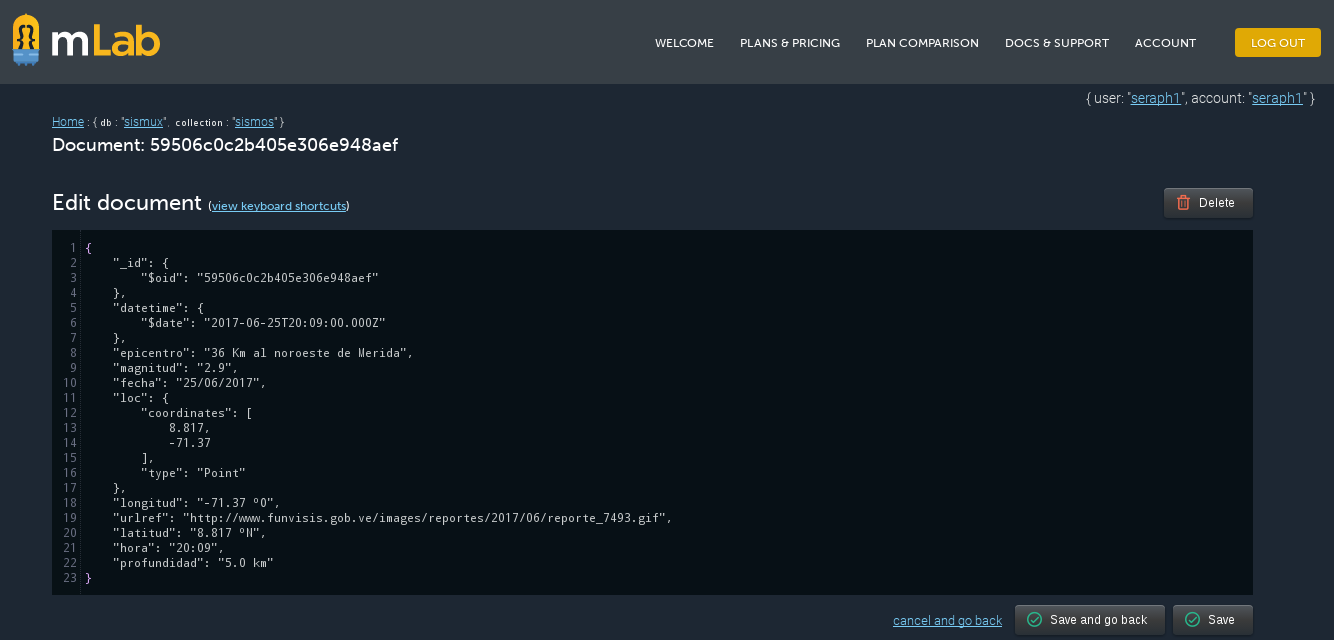
The following figure shows a document stored in the database:
The API will be developed in the next article.
Note: A future article will show how to create a daemon and how to get it running with SystemD, as well as the packaging of all the modules developed.
Make a donation! If you liked the article you can make a donation with Bitcoin (BTC) using the digital wallet of your choice to the following address: 17MtNybhdkA9GV3UNS6BTwPcuhjXoPrSzV
Or by scanning the QR code from your wallet:
